
What 10DLC Registration Is (and Why It Exists)
10DLC registration is the process of formally identifying your business to U.S. wireless carriers so they’ll allow your text messages to reach recipients. Without it, your messages are treated as unverified traffic — filtered, throttled, or blocked.
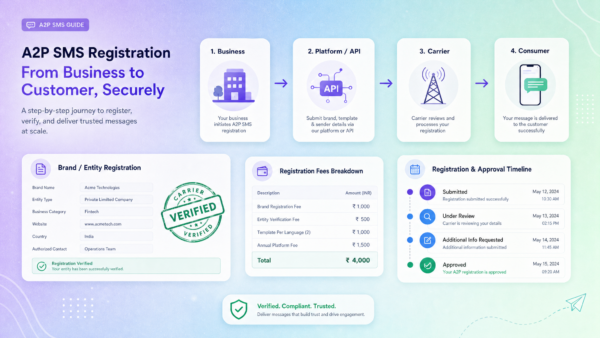
The registration system is administered by The Campaign Registry (TCR), a third-party organization that serves as the clearinghouse between businesses, messaging platforms, and the major carriers (AT&T, T-Mobile, Verizon). You don’t submit directly to the carriers — your messaging platform (like ZeitBlast) files on your behalf.
If you want the full background on what 10DLC is and why carriers built this system, read our What Is 10DLC guide. This article is the practical how-to: exactly what to submit, when, what it costs, and how to avoid the mistakes that delay approvals.
Key takeaways before we dive in:
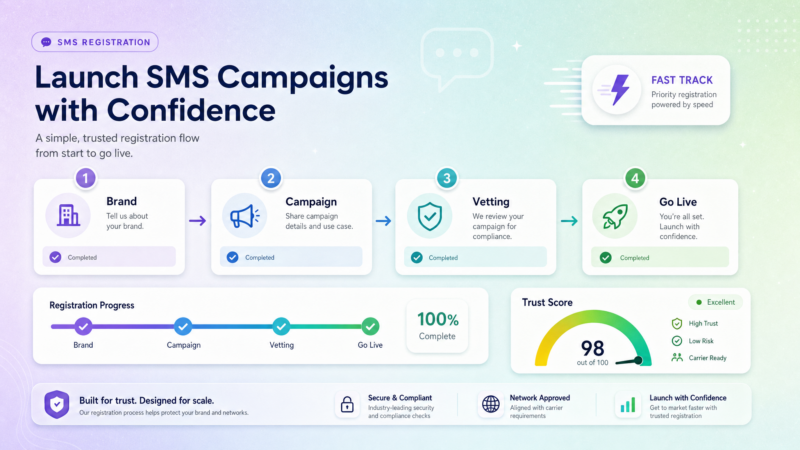
- Registration has two stages: brand (who you are) and campaign (what you’ll send)
- Brand approval is usually a few business days; campaign review currently runs 10–15 days
- A clean first application is the fastest path — rejections add weeks
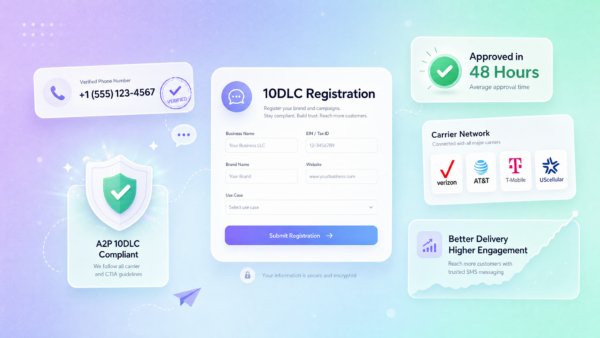
- ZeitBlast’s guided process gets most customers approved in as little as 48 hours
What You’ll Need Before You Start
Gathering these materials before you begin will make the process faster and reduce back-and-forth:
For Brand Registration:
- Your legal business name exactly as it appears on IRS records
- Your Employer Identification Number (EIN) — must match IRS records precisely
- Your business address (registered address, not P.O. Box)
- Your business website URL
For Your Website (Pre-Check):
- Site must be live and functional (not “under construction”)
- Privacy policy that specifically references how you collect and use SMS/phone data
- Content consistent with your stated business purpose
For Campaign Registration:
- Your use case (e.g., lead generation follow-up, appointment reminders, marketing promotions)
- 2–5 sample messages written as realistic texts you’d actually send
- Description of your opt-in method — exactly how contacts consent to receive your texts
- Opt-out language you’ll include in messages
Don’t have a website with a proper privacy policy? That needs to be resolved first. A missing or inadequate privacy policy is one of the most common rejection triggers and it’s fully within your control.
Step 1: Register Your Brand
Brand registration is the foundation. It answers the question: who is sending these messages?
What You Submit
You’ll provide your business identity details to The Campaign Registry through ZeitBlast’s dashboard:
- Legal business name — Copy this character-for-character from your IRS documentation. “Smith Properties LLC” is not the same as “Smith Properties, LLC” to an automated verification system.
- EIN (Employer Identification Number) — Your federal tax ID. This is verified against IRS records. A single-digit mismatch will fail verification.
- Business type — Public company, private company, non-profit, government, or sole proprietor. Each has slightly different verification requirements.
- Business address — Physical registered address.
- Website — Must be active and relevant to your stated business purpose.
What Carriers Check
Carriers run your submission through automated verification against public business records. They’re looking for confirmation that your business is real, registered, and matches what you’ve told them. A discrepancy triggers a manual review or rejection.
For real estate businesses and solo operators in particular: make sure your business name on this application matches exactly how it appears in your state’s business registration database and on any IRS correspondence.
Brand Approval Timeline
Brand registration is typically the faster stage — usually a few business days for clean applications. ZeitBlast pre-checks your details before filing, which reduces the chance of a basic data mismatch causing a delay.
Step 2: Register Your Campaign
Campaign registration is the more demanding step. It tells carriers what you’ll be sending and why — and it’s where the majority of rejections happen.
What a “Campaign” Actually Is
Despite the name, a 10DLC campaign is not a marketing campaign. It’s a registered use-case record. A single 10DLC campaign registration covers an entire category of messaging — like “real estate lead follow-up” — and you can run unlimited actual marketing campaigns under one registration as long as they match the approved use case.
What You Submit
Use Case Select the category that best describes your messaging. Common approved use cases include:
- Marketing and promotions
- Lead follow-up / customer care
- Appointment reminders
- 2FA / account security
- Informational alerts
Note: Some use cases — particularly lead generation, affiliate marketing, and debt-related services — face heavier scrutiny or outright restrictions. Be accurate about what you’re sending. Describing your lead gen campaign as “appointment reminders” to get easier approval will result in rejection when your sample messages don’t match.
Sample Messages Provide 2–5 realistic text messages that represent what you’ll actually send. This is the single most important element of your campaign registration and the most commonly botched.
What carriers want to see:
- Real messages, written as if you’re texting an actual lead today
- Your business name identified in the message
- An opt-out instruction (e.g., “Reply STOP to opt out”)
- Content that clearly matches your stated use case
What will get you rejected:
- Templates with
{FirstName}or[INSERT OFFER HERE]placeholders - Generic filler text that doesn’t reflect your actual messages
- Messages that describe one use case while your stated use case describes another
Opt-In Description Explain precisely how your contacts consented to receive your texts. Carriers want specifics:
- “Contacts fill out a web form at [URL] that includes a checkbox stating they agree to receive SMS marketing from [Business Name].”
- “Contacts text the keyword START to our number from our website.”
- “Leads are captured via our landing page, which includes a disclosure that they’ll receive follow-up texts from [Business Name] and can reply STOP to opt out.”
Vague descriptions like “contacts provided their number” don’t pass review. Show the mechanism.
Opt-Out Language Confirm what opt-out instruction appears in your messages — typically “Reply STOP to unsubscribe” or similar. This field should match your actual message templates.
Campaign Review Timeline
Campaign review is the longer leg of the process. As of mid-2026, industry-wide campaign review times are running approximately 10–15 days due to high submission volume. Rejections reset the clock entirely.
ZeitBlast’s pre-submission review — where we check your application against carrier requirements before filing — significantly reduces the risk of first-attempt rejection. Our guided dashboard also makes it harder to accidentally submit something that will fail basic review.
Step 3: Vetting and Trust Scores
Once your brand is approved, it receives a trust score — a rating on a scale of 0 to 100 that carriers use to set your daily message sending limits.
How Trust Scores Are Assigned
The score is calculated based on:
- Quality and completeness of your business registration
- Business type (public companies and established large businesses typically score higher)
- Length of business history (where verifiable)
- Optional third-party vetting
For most small businesses and solo operators, trust scores will fall in the low-to-mid range by default.
Why Your Trust Score Matters
Your trust score directly controls your throughput — how many messages you can send per day before hitting carrier-imposed limits. T-Mobile in particular enforces hard daily caps.
| Brand Type | T-Mobile Daily Limit | All Carriers Combined |
|---|---|---|
| Sole proprietor | ~1,000 message segments | ~3,000 segments |
| Low-volume standard | ~2,000 segments | ~6,000 segments |
| Standard (higher trust score) | 2,000+ (scales with score) | Scales significantly |
For context: a single SMS message is one segment. MMS messages and longer texts count as multiple segments. At 3,000 segments per day across all carriers, you could send roughly 90,000 messages per month — sufficient for many growing operations, but a bottleneck for high-volume lead generation.
Optional Third-Party Vetting
For businesses that need higher throughput, third-party vetting organizations approved by TCR can verify your business details and raise your trust score. There’s a fee involved, and the improvement isn’t guaranteed, but for high-volume senders it’s worth evaluating.
ZeitBlast can advise on whether vetting makes sense for your send volume during onboarding.
Step 4: Link Your Number and Go Live
Once both your brand and campaign registrations are approved, the final step is associating your 10-digit sending number with your approved campaign. This link is what authorizes the carrier to deliver your messages.
With ZeitBlast, this is handled through your dashboard. Your premium local sending number — included with every ZeitBlast plan — is linked to your registered campaign as part of the setup process. You don’t need to source or port a number separately.
Once the number is linked:
- You’re cleared to send within your throughput tier
- Compliance features (opt-out handling, quiet hours, DNC scrub) are active
- Carrier-safe batching manages your send rate automatically
10DLC Registration Costs
Registration involves fees at two levels: your platform’s fees (which vary by provider) and carrier pass-through fees set by TCR and the carriers themselves.
Carrier/TCR Fees
These are charged regardless of which platform you use:
| Fee | Type | Notes |
|---|---|---|
| Brand registration | One-time | Paid once per business |
| Campaign registration | Monthly, recurring | Per campaign; varies by use case type |
| Third-party vetting | One-time, optional | Only if you need to raise your trust score |
A Note on Costs
Specific dollar amounts for carrier/TCR fees change periodically, and different campaign types (charity, political, standard marketing) carry different fee structures. The right approach is to confirm current fees directly with your platform at signup rather than relying on numbers that may be outdated by the time you read this.
With ZeitBlast, 10DLC registration guidance and setup support are included with your plan. The Campaign Registry’s monthly campaign fee passes through at cost — we don’t mark it up. Our pricing is flat and transparent: plans start at **495/month∗∗(I′mSerious,15,000texts/month),795/month (Time to Scale, 30,000 texts/month), and $1,495/month (Market Dominator, 65,000 texts/month).
All plans include:
- Premium local sending number
- 10DLC approval in as little as 48 hours
- Unlimited incoming and reply messages
- DNC & litigator scrub
- Credit rollover
- Live support (phone, chat, and email)
How Long 10DLC Registration Takes
Brand registration: Typically 2–5 business days for clean applications. ZeitBlast’s pre-submission review catches common issues before filing.
Campaign registration: Currently running 10–15 days industry-wide due to high submission volume. This is the stage that benefits most from getting it right on the first attempt — a rejection sends you to the back of the queue and adds another full review cycle.
With ZeitBlast’s fast-track process: Most customers are approved and sending in as little as 48 hours. Our established carrier relationships and submission track record allow us to move registrations through faster than businesses filing independently.
Top Rejection Reasons (and How to Avoid Them)
Most 10DLC rejections come from a predictable set of mistakes. Here’s what to watch for:
1. Business Name or EIN Mismatch
This is the single most common rejection reason. Your business name on the application must match your IRS documentation exactly — same capitalization, same punctuation, same abbreviations. “Smith Realty LLC” and “Smith Realty, LLC” will fail automated cross-reference.
Fix: Pull your actual IRS EIN confirmation letter and copy the name verbatim.
2. Weak or Non-Compliant Website
Carriers evaluate your website as part of brand registration. A site that’s incomplete, has broken links, lacks a privacy policy, or doesn’t clearly describe your business in a way that’s consistent with your stated use case will trigger rejection.
Fix: Before registering, check that your website:
- Is live and navigable
- Has a privacy policy that mentions SMS/phone data
- Accurately reflects your business type and services
3. Sample Messages Don’t Match Use Case
If your stated use case is “appointment reminders” but your sample messages are promotional sales texts, carriers will reject. If your sample messages use placeholders instead of realistic text, carriers will reject.
Fix: Write sample messages as actual texts you’d send to an actual lead today. Use your business name, include an opt-out instruction, and make sure they clearly illustrate the use case you registered.
4. No Clear Opt-In Description
“Users provide their phone number” is not a sufficient opt-in description. Carriers want to understand the consent mechanism — where it happens, what language is used, and what the contact is agreeing to.
Fix: Describe the exact process: the URL of the opt-in form, the checkbox text, the keyword campaign, or the signed document. Be specific.
5. Prohibited Use Cases
Certain business categories simply won’t be approved through standard 10DLC channels:
- Payday loans, debt consolidation, or high-risk financial products
- Affiliate marketing and lead aggregation (selling leads to third parties)
- SHAFT content (sex, hate, alcohol, firearms, tobacco)
- Cannabis, online gambling, and some sweepstakes
If your use case touches these categories, standard 10DLC registration is not the path. There may be alternative carrier options for some restricted categories — consult your platform.
6. Mismatched Website and Campaign Description
If your website describes a real estate business but your campaign registration says “healthcare appointment reminders,” the inconsistency will be caught. Everything across your brand registration, campaign, and website needs to tell the same coherent story.
Throughput Tiers: What Your Trust Score Unlocks
Understanding throughput tiers helps you plan your campaigns and avoid situations where you’re hitting carrier limits mid-send.
Message Segments
A message segment is a single 160-character SMS. Messages over 160 characters or MMS messages (with images) count as multiple segments. Most conversational texts are one segment; longer automated messages may be two or three.
T-Mobile Daily Limits (Key Reference Point)
T-Mobile has the strictest per-carrier limits. Their daily thresholds by brand tier:
- Sole proprietor: ~1,000 segments/day
- Low-volume standard: ~2,000 segments/day
- Standard with strong trust score: Can scale significantly higher with optional vetting
ZeitBlast’s carrier-safe batching automatically manages your daily send volume across carriers, ensuring you stay within your approved limits. If you’re approaching your tier’s ceiling, our team can advise on vetting options to raise your throughput.
How ZeitBlast’s 48-Hour Fast-Track Works
Filing 10DLC registration on your own means learning carrier requirements through trial and error. First-time applicants regularly hit rejection reasons that wouldn’t have been issues with a guided submission process — and each rejection adds a full review cycle.
Here’s how ZeitBlast’s registration process is different:
Pre-submission review: Before we file anything with TCR, our team reviews your brand details and campaign submission for the most common rejection triggers: name/EIN consistency, website quality, sample message formatting, opt-in language. Issues get flagged before they reach the carriers.
Carrier-optimized submissions: Our established filing history with TCR and the major carriers means our submissions are recognized, formatted to expectations, and processed without the friction that unfamiliar submitters encounter.
Guided dashboard: ZeitBlast’s 10DLC setup walks you through each required field with in-context guidance. You’re not guessing what “opt-in description” means or how realistic your sample messages need to be.
Direct carrier relationships: ZeitBlast has direct relationships with the major carriers. This gives us visibility into processing status and the ability to resolve issues faster than platforms that file through intermediaries.
The result: most ZeitBlast customers are registered and sending in as little as 48 hours — compared to the 10–15 day industry average.
Once registration is complete, ZeitBlast’s built-in compliance layer keeps you on the right side of the rules on every subsequent send — automatic opt-out handling, quiet-hour enforcement, unlimited DNC & litigator scrub, and carrier-safe batching.
For the compliance rules that govern your behavior after registration, read our TCPA Compliance Guide, which covers the FCC’s requirements for consent, opt-outs, and quiet hours.
Frequently Asked Questions
How do I register for 10DLC? Through your messaging platform. You submit your brand details and campaign information via ZeitBlast’s dashboard, and we file it with The Campaign Registry on your behalf. You don’t register directly with the carriers.
Can I register for 10DLC myself without a platform? Technically, you can attempt to work through a reseller or direct TCR access, but the practical reality is that without a platform’s guidance, rejection rates for first-time applications are high. The time cost of rejections usually exceeds any savings from DIY filing.
What is a 10DLC trust score? A 0–100 score assigned to your approved brand by The Campaign Registry. It determines your daily sending throughput — higher scores allow more messages per day. Optional third-party vetting can raise a borderline score.
How much does 10DLC registration cost? There’s a one-time brand registration fee and a recurring monthly campaign fee. Exact amounts vary by provider and campaign type, and TCR periodically adjusts them. Confirm current fees with your platform at signup.
What happens if my 10DLC application gets rejected? You’ll receive a rejection reason. Fix the issue and resubmit. Each resubmission goes back into the review queue, which is why getting it right the first time matters. ZeitBlast’s pre-submission review is designed to prevent the most common rejection scenarios.
Do I need separate 10DLC registration for each campaign I run? No. A 10DLC campaign registration covers a use case category. You can run unlimited individual marketing campaigns under one registration as long as they match your approved use case. You’d only need multiple campaign registrations if you have distinct, different use cases.
How many phone numbers can I link to one campaign? You can link multiple numbers to a single approved campaign. ZeitBlast includes a premium local sending number with every plan, and additional numbers are available if needed.
Get Registered and Start Sending
10DLC registration is a one-time process that unlocks legitimate, carrier-delivered business texting. The businesses that stall are the ones that try to navigate it alone — hitting rejections, waiting in review queues, and starting over.
ZeitBlast removes that friction. We handle your brand and campaign registration, pre-check your application before it goes to the carriers, and get most customers approved in as little as 48 hours. From there, your sending is backed by carrier-safe batching, built-in TCPA compliance, and a 98% deliverability rate.
Plans start at $495/month with 15,000 texts, unlimited incoming messages, and full compliance infrastructure included.
Ready to get registered? Request a ZeitBlast Demo and we’ll walk you through setup from day one.
Also in this series: What Is 10DLC? and TCPA Compliance for Business Texting.