
Texting from a computer sounds simple — and it is, once you know which tool matches your actual goal. There are two fundamentally different situations:
- You want a bigger keyboard for personal texts. Mirror your phone to your computer. It’s free, takes 5 minutes, and works on Mac, Android, and Windows.
- You’re a business texting customers. You need a browser-based SMS platform with a dedicated business number, a shared inbox, contact lists, and compliance built in. Your personal phone won’t cut it.
This guide covers both, including exactly where each approach falls short, so you can pick the right tool for what you’re actually trying to do.
The Two Approaches: Personal vs. Business {#two-approaches}
| Situation | Right Tool | Why |
|---|---|---|
| Texting friends/family from a laptop | Phone mirroring (iMessage, Google Messages, Phone Link) | Free, uses your personal number, one conversation at a time |
| Texting customers, prospects, or a list | Browser-based SMS platform (ZeitBlast) | Business number, 10DLC registration, shared inbox, compliance |
The moment you’re texting customers — even a small list — the personal tools break down. They send from your personal cell, one conversation at a time, with no opt-out handling, no contact lists, and no compliance. Carriers also filter unregistered business-volume traffic from personal lines.
How to Text From Your Computer for Personal Use {#personal-tools}
If you just want a full keyboard for personal texting, your phone already mirrors to your desktop. Three options based on what you carry.
iMessage on Mac {#imessage}
Works with: iPhone + Mac
- On your iPhone, go to Settings → Messages → Text Message Forwarding
- Toggle on your Mac
- On your Mac, open the Messages app and sign in with your Apple ID
You’ll now see iMessages and SMS (green-bubble texts) in the Mac Messages app. Type from your keyboard and send as if you’re on your phone.
Limitation: Apple ecosystem only. Tied to your Apple ID and personal number. Requires your iPhone and Mac to be connected to the same Apple ID.
Alt text suggestion: Mac Messages app showing iMessage and SMS threads on a laptop screen
Google Messages for Web (Android) {#google-messages}
Works with: Android phone + any browser
- On your Android phone, open Google Messages
- Tap the three-dot menu → Device pairing
- On your computer, visit messages.google.com/web
- Scan the QR code with your phone
Your texts appear in the browser window. You can send and receive from your computer.
Limitation: Android only. Your phone must stay on and maintain an internet connection. Once the phone goes offline, the web interface stops working.
Phone Link on Windows {#phone-link}
Works with: Windows 10/11 + Android or iPhone
- Open Phone Link on your Windows PC (search for it in Start)
- Follow the on-screen pairing process — scan a QR code with your phone
- Open Messages in Phone Link to send and receive texts
Limitation: Built for personal use. iOS support is limited compared to Android. Works through Microsoft’s relay, which requires your phone to be nearby and connected.
Why Personal Tools Don’t Work for Business Texting {#why-personal-fails}
All three personal tools share the same core limitation: they relay texts through your personal phone, from your personal number, one conversation at a time.
That’s exactly right for texting a friend. It breaks immediately for texting customers:
No shared inbox. If you’re on a team, a teammate can’t see or respond to a reply. Every conversation is siloed to your phone.
Your personal number is exposed. Every customer gets your personal cell number. That’s a privacy problem and a business continuity problem — if you leave, all those customer conversations go with you.
One contact at a time. You can’t import a list of 200 leads and send to them simultaneously. The tools are built for individual conversations, not campaigns.
No 10DLC registration. Carriers require businesses to register their brand and campaign before texting at volume (10DLC explained). A personal number isn’t registered. At any meaningful volume, carriers will filter or block those texts.
No compliance controls. No opt-out handling, no quiet-hours enforcement, no litigator scrub. The TCPA requires these for business texting — personal mirroring tools have none of them.
No automation. No templates, no drip sequences, no scheduled sends. Every message is manual.
How to Text Customers From a Computer (for Business) {#business-texting}
Business texting from a computer is a different job. You need:
- A dedicated business number — texts go out from your business, not your cell
- 10DLC registration — the carrier-side setup that makes business texts deliver
- A two-way inbox — replies land somewhere your whole team can see and respond
- Contact lists — import customers, tag them, segment them, send to groups
- Compliance built in — opt-out handling, quiet hours, litigator scrub, all automatic
- Campaigns and automation — send to many people at once, on schedule, with sequences
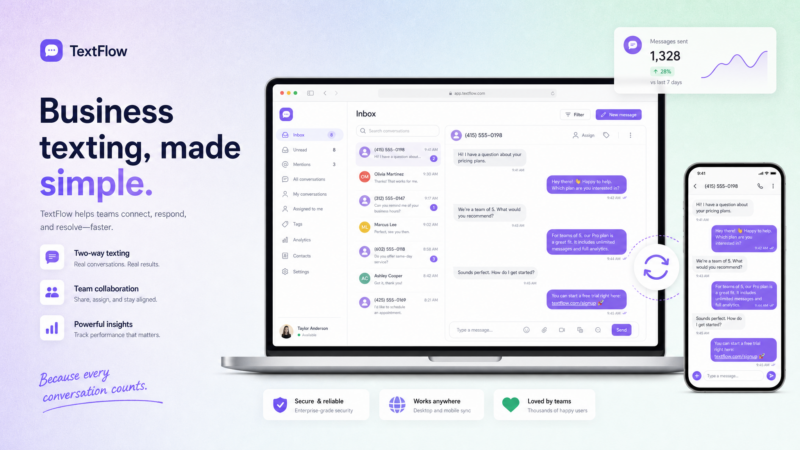
A browser-based SMS platform gives you all of this in a single tab. Nothing installed on your computer. Nothing tied to your personal phone. The platform has its own number, its own registration, and its own inbox.
Personal Tools vs. a Business SMS Platform {#comparison}
| Feature | Personal Tools (iMessage, Google Messages, Phone Link) | ZeitBlast (Business SMS Platform) |
|---|---|---|
| Number used | Your personal cell number | Dedicated business number |
| Send to a list | One person at a time | Hundreds or thousands at once |
| Team inbox | No — lives on your phone | Shared two-way conversations inbox |
| Contact management | Your phone’s contacts | Importable lists, tags, segments |
| 10DLC registration | None | Built-in — approval in 48 hours |
| Opt-out handling | None | Automatic |
| Quiet hours enforcement | None | Automatic |
| Litigator scrub | None | Unlimited, built-in |
| Automation / drip | None | Automated drip campaigns |
| AI follow-up | None | AI Conversation Agent |
| Needs your phone on | Yes | No — runs in the browser |
| Best for | Personal texts on a bigger keyboard | Texting customers at scale |
How ZeitBlast Works From a Browser {#how-zeitblast-works}
ZeitBlast runs entirely in your browser. Open a tab, sign in, and you’re texting customers from your computer — no app to install, nothing tethered to your personal phone.
Step 1: Get your number and register. Buy a dedicated local business number in-app. ZeitBlast guides your 10DLC brand and campaign registration and submits it on your behalf. Approval typically lands in 48 hours — one of the fastest timelines in the industry.
Step 2: Import your contacts. Upload a CSV or spreadsheet of your contacts (up to 10,000 rows at a time). Tag them by source, interest, or location. Build segments to target specific groups with specific messages.
Step 3: Compose and send. Write your message using saved templates and merge fields like {firstName}. Send a one-off text, a campaign blast, or trigger a drip sequence that runs automatically. Schedule sends for the optimal time.
Step 4: Work the replies. Every response lands in the shared conversations inbox. Anyone on your team can pick up a reply, tag it, and respond. The full conversation history is right there — no context lost.
ZeitBlast’s AI Conversation Agent takes this further: it automatically reads inbound replies, qualifies leads based on your rules, responds appropriately, and escalates when it’s time for a human. Your team handles warm, ready conversations — not cold inbox management.
Alt text suggestion: ZeitBlast browser interface showing conversation inbox with incoming replies
Which Approach Is Right for You? {#which-to-use}
Texting a friend or family member from your laptop? Use the free personal tools. iMessage for Mac users, Google Messages for web for Android users, Phone Link for Windows users. They’re free and mirror your phone perfectly.
Texting customers, prospects, or any business list? Use a browser-based SMS platform. You need a business number, a shared inbox, 10DLC registration, and compliance — the personal tools simply don’t have any of that.
Not sure which SMS platform to pick? See our roundup: The Best Mass Texting Apps in 2026.
Start Texting With ZeitBlast
Business texting from a browser — dedicated number, shared inbox, AI follow-up, and 10DLC registration in as little as 48 hours. No phone required.
Plans start at $495/mo for 15,000 texts with unlimited incoming messages.
Request a Demo → zeitblast.com/contact
Related Reading
- The Best Mass Texting Apps in 2026
- Email to SMS: How to Send a Text From Email (2026)
- What Is 10DLC? The Complete Guide
FAQ {#faq}
How do I text from my computer for free? Use the free mirroring tool that matches your phone. Mac users open the Messages app and enable Text Message Forwarding from iPhone settings. Android users visit messages.google.com/web and scan the QR code from the Google Messages app. Windows users pair their phone with Phone Link. All three are free and route through your existing number.
Can I text from my computer without a phone? Not with the personal mirroring tools — they all relay through your phone, which must stay on and connected. A browser-based business SMS platform is different: it runs in the browser with its own dedicated number, so your computer can send and receive texts with no phone involved.
How do businesses text customers from a computer? Businesses use a browser-based SMS platform instead of mirroring a personal phone. This gives them a dedicated business number, 10DLC registration so texts deliver, a shared inbox for replies, contact lists for bulk sends, and compliance controls (opt-out, quiet hours, scrubbing). ZeitBlast does all of this from the browser.
How do I text from my computer without using my personal number? Get a dedicated business number from a SMS platform. ZeitBlast lets you buy a local number in-app, register it for 10DLC, and send every message from that line — keeping your personal cell private and maintaining a consistent business identity.
Can I send the same text to many people from my computer? Yes, but only with a business SMS platform — not with personal mirroring tools, which send one conversation at a time. A platform lets you import a contact list and send a campaign or blast to hundreds or thousands at once, with scheduling and merge fields for personalization.
Is texting from a browser secure for business? A business SMS platform keeps messaging on a registered business number with compliance controls — opt-out handling, quiet hours enforcement, and list hygiene. For the regulatory framework, see the FCC telemarketing rules and CTIA Messaging Principles. This is not legal advice.
What is the difference between iMessage and SMS when texting from a Mac? iMessage (blue bubbles) uses Apple’s internet-based messaging protocol and works between Apple devices. SMS (green bubbles) routes through your carrier as traditional text messages. When Text Message Forwarding is enabled on iPhone, your Mac can send and receive both. For business texting to customers on any phone type, a dedicated SMS platform is the right tool — not iMessage forwarding.