
SMS and MMS both land in the same message thread on your recipient’s phone. They use the same carrier network. Neither requires an app or a Wi-Fi connection. But they’re fundamentally different tools — and choosing the wrong one either blows up your costs or leaves impact on the table.
Here’s the complete breakdown: what each format actually is, how character limits and segmentation affect your bill, when each one is the right call, and how ZeitBlast handles both in a single campaign.
SMS vs MMS at a Glance
| SMS | MMS | |
|---|---|---|
| Stands for | Short Message Service | Multimedia Messaging Service |
| Content | Text only | Text + images, GIFs, audio, short video |
| Text limit | 160 characters per segment | Up to 1,600 characters |
| Media | None (links only) | Photos, GIFs, audio, video, vCards |
| Requires internet | No | No (uses carrier data, not Wi-Fi) |
| Reach | Every mobile phone | Virtually every smartphone |
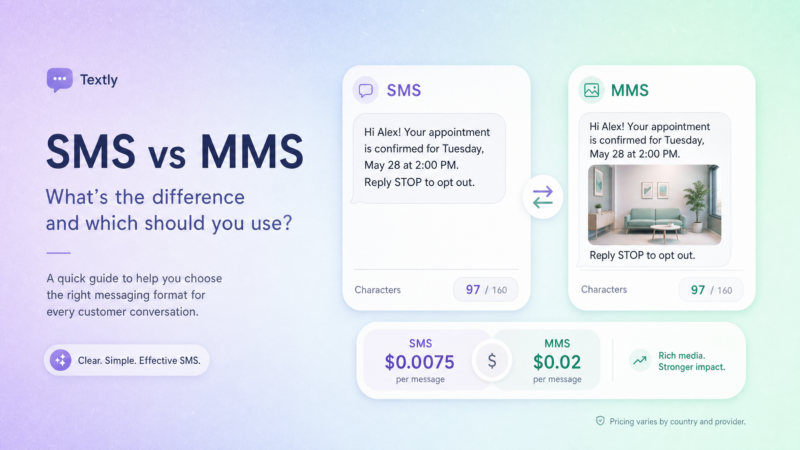
| Relative cost | Lower | ~3x a single SMS segment |
| Best for | Alerts, reminders, links, confirmations | Property photos, coupons, flyers, longer copy |
Both message types ride the carrier network — no app required, no login, no Wi-Fi dependency. That universal reach is why business texting consistently outperforms email open rates — Mailchimp’s industry benchmarks put average email open rates well below SMS’s 98%.
What Is SMS?
SMS stands for Short Message Service. It’s the original text message, unchanged in structure since the early 1990s. It carries plain text only — no images, no formatting, no buttons. You can include a URL, but the recipient sees raw text. No auto-preview, no embed.
What SMS has going for it is total universality. Every mobile phone ever made handles SMS. A basic flip phone from 2004 and the latest iPhone both receive SMS without issue. No smartphone required. No data plan needed. That reach is why carriers and businesses reach for SMS first when the message absolutely has to land: appointment reminders, one-time passcodes, lead follow-ups, status updates.
The 160-Character Limit Explained
A single SMS segment holds 160 characters. That’s not an arbitrary design choice — it’s the maximum that fits in a 140-byte message payload using GSM-7, the standard encoding for Latin-alphabet text — as documented in Twilio’s SMS developer guide.
Stay under 160 characters and you send exactly one segment. Go over, and things get more expensive fast.
One important caveat: emojis and special characters change everything. The moment your message includes an emoji, an accented letter, or any non-standard character, your encoding switches from GSM-7 to Unicode (UCS-2). Unicode doubles the byte cost of each character, which cuts a single message down to just 70 characters before it splits into segments.
| Message type | Single segment limit | Per-segment limit (multi-part) |
|---|---|---|
| Plain text (GSM-7) | 160 characters | 153 characters |
| Any emoji or special character (Unicode) | 70 characters | 67 characters |
That emoji distinction hits harder than most people expect. If you’re sending to 10,000 contacts and your message has one emoji that pushes it into the next segment, you’ve just doubled your send cost.
How Segmentation Works — and Why It Matters for Your Budget
When a message exceeds the single-segment limit, the carrier splits it into multiple parts and reassembles them on the recipient’s phone. The recipient sees one complete message. You get billed for every segment.
The catch: multi-part messages don’t get a full 160 characters per segment. Each segment gives up 7 characters to a reassembly header, leaving you 153 usable characters per segment (or 67 per segment with Unicode encoding).
A 300-character plain-text message = 2 segments. The same 300-character message with one emoji = up to 5 segments.
For occasional sends that’s a nuisance. For high-volume campaigns, it can quietly double or triple your text credit spend without any visible warning.
What Is MMS?
MMS stands for Multimedia Messaging Service. It’s the natural evolution of SMS — built on the same carrier infrastructure, but capable of carrying media alongside (or instead of) text.
An MMS can carry:
- Photos and images
- Animated GIFs
- Short video clips
- Audio files
- vCards (digital contact cards)
- Extended text (up to 1,600 characters)
The recipient doesn’t need Wi-Fi to receive an MMS. Cellular data handles the media delivery — the same way a phone loads data on a cellular connection. No app required, no login needed.
What You Can Send via MMS
For business senders, MMS opens up a completely different class of message:
- Real estate: Send a front-of-house photo with a new listing alert. The property renders right in the message thread, before the contact even has to click.
- Retail and restaurants: Coupon graphics and dish photos pull higher engagement than text descriptions.
- Events: Flyers and schedules land as images, not as links that may or may not get clicked.
- Property management: Floor plans, maintenance updates with photos attached.
The visual does something a URL link never quite manages — it stops the scroll before the contact decides whether to tap.
MMS File Size Limits
Per CTIA Messaging Principles and Best Practices, carriers cap MMS attachments, typically in the 300KB–600KB range. Video clips generally run around 30–40 seconds before compression kicks in. Most professional photos and GIFs fit within limits easily. Larger video content needs to be compressed or hosted externally and linked.
ZeitBlast handles the technical side — media optimization happens on the platform so your images arrive at carrier-acceptable sizes without you resizing files manually.
Cost: SMS vs MMS
MMS costs more than SMS. That’s true across every business texting platform, because carriers charge more to route media than they charge to route plain text.
The standard industry ratio: an MMS runs approximately three times the cost of a single SMS segment.
With ZeitBlast, credits are built into plan pricing (no per-message surcharges layered on top). All three ZeitBlast plans include a set monthly credit allotment:
| Plan | Price | Credits/Month |
|---|---|---|
| I’m Serious | $495/mo | 15,000 |
| Time to Scale | $795/mo | 30,000 |
| Market Dominator | $1,495/mo | 65,000 |
Unused credits roll over — so you’re not throwing away budget on slow months.
Because MMS uses roughly 3 credits to an SMS’s 1, your effective message-per-month capacity shifts based on the mix. A campaign that’s 80% SMS and 20% MMS will stretch further than one that’s all MMS.
When MMS Is Actually Cheaper Than SMS
Here’s where the math surprises people. Long plain-text SMS messages — the kind that run 400, 500, or 600 characters — split into multiple segments and use multiple credits. A 500-character message could cost 4 SMS credits.
A single MMS holds up to 1,600 characters for the equivalent of 3 credits.
So if your copy is genuinely long and would span multiple SMS segments, sending it as a single MMS is not only cheaper — it also arrives as one clean message instead of a split-apart text that can look garbled on older devices.
The rule of thumb:
- Short copy (under ~300 characters, no emoji bloat) → SMS wins on cost
- Long copy (400+ characters) or media → MMS is often the better value
Reach and Deliverability
Both SMS and MMS reach essentially every mobile phone in the United States without any app, login, or internet requirement. That’s their core advantage over platform-dependent messaging tools like WhatsApp or iMessage.
SMS has slightly broader raw universality — it works on the oldest devices, including non-smartphones. MMS requires a device capable of rendering media, which in 2026 means virtually all phones in active use.
What actually drives deliverability in business texting isn’t message format — it’s your registration and sending hygiene. Business texting to US numbers operates under 10DLC compliance, registered through The Campaign Registry (TCR). Carriers validate that your traffic is legitimate before routing it at volume. Get that right, honor opt-outs, and both SMS and MMS land reliably.
ZeitBlast includes 10DLC approval in as little as 48 hours — the fastest in the industry — and handles carrier-safe batching automatically so your campaigns don’t trip spam filters. Our 98% deliverability rate reflects that infrastructure, not just the message format.
When to Use SMS vs MMS
The simplest frame: SMS for utility, MMS for impact.
Use SMS When
- The message is short and functional — a confirmation, a reminder, a status update
- Speed matters more than visuals (time-sensitive alerts, OTPs, follow-ups)
- A link does the job just fine — “Your showing is confirmed for Tuesday at 3pm. Add to calendar: [link]”
- You’re sending high volume and want to conserve credits
- Your audience includes older phones or rural areas where MMS reliability may be lower
Use MMS When
- A visual makes the message — a property photo, a coupon graphic, a restaurant dish, an event flyer
- You want brand presence in the thread — a logo or product image reads as more legitimate than plain text
- The copy is genuinely long and a multi-segment SMS would cost as much or more
- You’re running a promotion where the image is the offer
- You want a contact to stop scrolling and look before deciding whether to act
Real-World Examples
| Scenario | Best format | Why |
|---|---|---|
| Real estate: new listing alert | MMS | Front-of-house photo stops the scroll; the visual sells the showing |
| Medical: appointment reminder | SMS | Short, functional, no image needed |
| Restaurant: weekend special | MMS | Dish photo drives salivation; the visual earns its cost |
| Lender: application follow-up | SMS | Fast, direct, link-driven action |
| Event: ticket confirmation | SMS | Short and clear; link to venue details |
| Retail: flash sale with coupon | MMS | Coupon graphic is the offer |
| Property management: lease renewal | SMS or MMS | SMS if short; MMS if including the renewal doc or floor plan |
ZeitBlast supports both formats in the same campaign builder. Compose your message, add an image to make it MMS, leave it text-only for SMS — the credit cost adjusts in real time so you always know what you’re spending before you hit send.
How ZeitBlast Handles SMS and MMS
ZeitBlast is built for high-volume business texting — which means both SMS and MMS need to work at scale, reliably, with compliance baked in.
Here’s what that looks like in practice:
Same platform, both formats. There’s no separate campaign type for MMS. You build your message in the ZeitBlast campaign builder, attach media to go MMS or leave it text for SMS, and the system handles the rest.
Media optimization. ZeitBlast automatically resizes and compresses your images to carrier-accepted dimensions. You don’t need to manually resize a property photo before attaching it.
Carrier-safe batching. Whether you’re sending SMS or MMS, ZeitBlast sends at carrier-approved rates to avoid spam flags. Direct carrier relationships mean better deliverability and fewer blocks — especially important for high-volume MMS campaigns where media routing adds latency.
Automated drip campaigns with both types. You can build drip sequences that mix SMS and MMS — a text-only initial outreach, an MMS follow-up with a property photo, another SMS with a direct call to action. Each step in the sequence can be either format.
Real-time analytics. See delivery rates, reply rates, and opt-outs per campaign, per format. Know which message types are working for your audience before scaling spend.
Unlimited incoming and reply messages — always free. Whether your MMS campaign triggers a wave of replies, every inbound text is included. You’re never penalized for engagement.
SMS, MMS, and What About RCS?
RCS (Rich Communication Services) — standardized by the GSMA — gets mentioned alongside SMS and MMS as the next generation of business messaging. It adds features like read receipts, typing indicators, and verified business branding inside the native messaging app.
As of 2026, Apple added RCS support in iOS 18, so it now works between iPhones and Android — but coverage is still carrier-dependent and not universal. A message sent via RCS falls back to SMS if the recipient’s carrier or device doesn’t support it.
For business texting that has to reach everyone reliably today, SMS and MMS remain the foundation. RCS is a real technology worth watching as it matures, but it’s not yet the universal layer that SMS has been for decades.
If you want the full picture, read our RCS Messaging Explained guide.
Frequently Asked Questions
What is the SMS character limit? A single SMS segment holds 160 characters using GSM-7 encoding. If your message is longer, it splits into multiple segments billed separately, and each segment holds 153 characters (not 160) because some space goes to reassembly headers. Add an emoji or special character and encoding switches to Unicode, dropping the limit to 70 characters per segment (67 when multi-part).
What’s the difference between SMS and MMS? SMS carries plain text only, up to 160 characters per segment. MMS carries media — images, GIFs, audio, video — and supports up to 1,600 characters of text. Both use the carrier network and don’t require an app, but MMS costs roughly three times a single SMS segment.
Is MMS always more expensive than SMS? Not necessarily. If your plain-text message is long enough to span four or more SMS segments, a single MMS can be cheaper and arrive as one clean message. MMS only costs more than SMS when your SMS is genuinely short.
Can I send MMS to any phone? MMS works on virtually any modern smartphone. Older non-smartphones may not render media, but in 2026 the vast majority of US mobile users have MMS-capable devices. In the rare case media doesn’t render, the text portion of the MMS still delivers.
Does ZeitBlast support MMS? Yes. ZeitBlast supports both SMS and MMS from the same campaign builder. You can attach images, GIFs, or other media to any campaign message, and the platform handles media optimization and carrier compliance automatically.
What file size can I send via MMS? Carriers typically support MMS attachments in the 300KB–600KB range. ZeitBlast automatically optimizes media attachments to stay within carrier limits so your images and GIFs land reliably.
Start Sending SMS and MMS with ZeitBlast
ZeitBlast gives you both SMS and MMS in one platform — with 10DLC compliance built in, 48-hour approval, carrier-safe batching, and a 98% deliverability rate. Whether you’re firing off short appointment reminders or high-impact property photo campaigns, it all runs from the same builder.
Request a demo at zeitblast.com/contact and see how ZeitBlast handles volume texting the right way.
Related reading:
- What Is SMS Marketing? — the full primer on texting customers at scale
- What Is 10DLC? — the registration that keeps your business texts deliverable
- TCPA Compliance — the consent rules that protect your campaigns
- RCS Messaging Explained — what RCS is and where it fits