
What Is Text to Give? {#what-is-text-to-give}
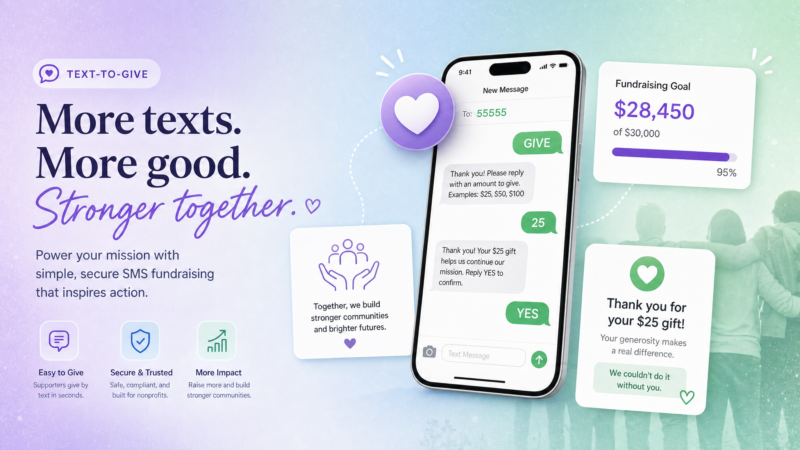
Text to give is mobile fundraising over SMS. A supporter texts a short keyword — GIVE, RESCUE, BUILD, FEED — to your organization’s number. They get an instant reply with a link to your donation page. They tap the link, choose an amount, and they’re done. Start to finish, under a minute. No app to download, no account to create, no desktop required.
The speed is the point.
Donors give in moments — during a match window, in response to an emotional appeal from a stage, on the day a disaster hits the news. That impulse is real and it’s brief. Blackbaud’s Charitable Giving Report and the M+R Benchmarks Study both document mobile giving as one of the fastest-growing nonprofit fundraising channels. Text to give catches the moment while it’s still open. With 97% of Americans owning a cell phone, a donor who would never think to sit down at a computer and navigate to your donation page will text a keyword from a gala table or a church pew without a second thought.
You’ll see this called text-to-donate, text giving, or SMS donations. The terminology is interchangeable, but the mechanics behind the scenes can differ significantly — which brings us to the two models.
The Two Text-to-Donate Models, Compared Honestly {#two-models}
Not all text-to-give works the same way. There are two fundamentally different approaches, and they behave very differently for nonprofits.
Model 1: Carrier-Billed Text-to-Donate
This is the classic model most people picture when they hear “text to give.” The donor texts a keyword to a short code (like 12345), and the donation gets added to their phone bill. The carrier collects it and eventually passes it to the nonprofit.
How it works: The gift is charged directly to the donor’s mobile account. The carrier acts as the payment processor. The nonprofit receives the funds after carrier processing.
The limitations are significant:
- Gift amounts are capped at small fixed amounts (typically 5or10 per message)
- Payout is slow — weeks to months before the nonprofit sees the money
- Setup requires a registered premium short code through an approved aggregator
- Eligibility is restricted to vetted 501(c)(3) organizations through specific carrier programs
- Carriers take a cut of each gift
- Donor data is limited — the nonprofit often doesn’t get a usable contact for follow-up
- Recurring giving is very difficult to configure
When it makes sense: Large telethons, national campaigns with significant media exposure, situations where the simplicity of “text a number and it goes to your phone bill” is genuinely the right UX. Think Red Cross disaster appeals or national public TV pledge drives.
Model 2: Keyword-to-Link Text Giving
This is what most nonprofits use today, and what any modern SMS platform enables. The donor texts a keyword and receives an instant automated reply containing a link to your donation page. The actual donation happens on your page, processed by your payment processor.
How it works: Your SMS platform listens for the keyword, fires a pre-written reply with your donation link, and the donor completes the gift on your page. Your payment processor handles the transaction on your normal schedule.
The advantages are substantial:
- No cap on gift size — donors can give any amount
- Money lands in your account on your processor’s normal schedule (days, not months)
- Works with any 10DLC number — no short code required
- Open to any organization with an opted-in list and a donation page
- You retain the donor’s contact information for future asks
- Recurring gifts are easy to set up on the donation page
- Full control over the giving experience, branding, and thank-you messaging
The one requirement: You need a mobile-friendly donation page and a payment processor. Most nonprofits already have this — it’s whatever you already use for online donations (your giving platform, Stripe, PayPal, etc.). The SMS platform handles the keyword response and the link delivery; your donation platform handles the payment.
For nearly every nonprofit — a food bank, a church, an animal shelter, a school booster club — keyword-to-link wins on every dimension that matters. The rest of this guide focuses there.
Side-by-Side Comparison
| Carrier-Billed | Keyword-to-Link | |
|---|---|---|
| How it works | Gift added to phone bill | Keyword reply sends donation link |
| Gift size | Capped at small fixed amounts | Any amount, donor’s choice |
| Money destination | Carrier collects, then pays you | Straight to your payment processor |
| Payout speed | Weeks to months | Your processor’s normal schedule |
| Setup requirements | Premium short code + carrier vetting | Pick a keyword + have a donation page |
| Eligibility | Vetted 501(c)(3), strict | Any organization with an opted-in list |
| Donor data | Limited | You keep the contact for re-asks |
| Recurring gifts | Very difficult | Easy via donation page |
| Cost to donor | Taken from phone bill | Processed normally through card/bank |
How to Set Up Text to Give Step-by-Step {#setup}
Keyword-to-link text giving can be operational in under a day. Here’s the complete setup sequence:
Step 1: Choose Your Keyword
Your keyword is what donors text in. It should be:
- Short — one word, easy to spell
- Memorable — something your emcee can say from a stage and donors will remember
- Relevant — tied to your cause or campaign (RESCUE, FEED, BUILD, HOPE, GIVE, SHELTER)
Examples:
- Animal shelter → RESCUE
- Food bank → FEED or HUNGER
- Church building campaign → BUILD
- General annual fund → GIVE
- Disaster relief push → HELP or RELIEF
Avoid abbreviations that might be confusing or have other common meanings.
Step 2: Set Up Your Donation Page
Your donation page needs to be:
- Mobile-first — the donor is on their phone; every element should work on a small screen
- Fast-loading — if it takes more than 3 seconds, you’re losing gifts
- Pre-populated with suggested amounts — three to five giving levels with a short impact line each (25feedsafamilyforaweek,50 provides a backpack of school supplies, $100 sponsors a month of shelter for one animal)
- Branded to your organization — not a generic checkout page
Use whatever giving platform you already run — most modern nonprofit giving tools (Classy, Donorbox, GiveWP, Stripe, etc.) produce mobile-friendly pages.
Step 3: Write Your Autoresponder
When a donor texts your keyword, your autoresponder fires instantly. This message should:
- Be warm but brief (one or two sentences)
- Include your organization name
- Deliver the donation link prominently
- Include opt-out language (“Reply STOP to opt out”)
Example:
“Thank you for supporting {OrgName}! Make your gift here: {donationLink}. Reply STOP to opt out.”
That’s it. The link does the work. The autoresponder just needs to deliver it fast and confirm the donor that they reached the right place.
Step 4: Set Up a Thank-You Message
After a donor gives, send a warm follow-up text. This can be triggered manually for event-based campaigns or automated through a post-gift workflow. It should:
- Confirm the gift with gratitude
- Reinforce the impact (“Your gift today helps feed 20 families this month”)
- Not immediately ask for more
The thank-you is where donor retention starts. A donor who feels acknowledged after their first gift is dramatically more likely to give again.
Step 5: Promote the Keyword Everywhere
The keyword only works if donors see it. At an event, that means:
- Slides — large, readable font on the slide when the ask is made
- Emcee script — “Text RESCUE to 555-0100 right now to give”
- Table tents / programs — printed reminder at every seat
- Social media — shared before and during the event
- Email — linked in your email campaigns for donors who see the email on their phone
For ongoing campaigns, include the keyword in your email signature, on your website, and in your social bios.
Step 6: Test the Full Flow Before Going Live
Before the event or campaign launch, text the keyword yourself. Verify:
- The autoresponder fires immediately with the correct link
- The donation page loads fast and looks right on mobile
- The payment flow completes correctly
- The thank-you message fires after a test donation
Test it on multiple phone types. If anything breaks during a live event, you’re leaving gifts on the table.
Best Practices That Make It Convert {#best-practices}
The mechanics are straightforward. What separates a text-to-give campaign that raises real money from one that barely gets used comes down to execution.
Make the keyword impossible to forget. At a live event, show it on screen for at least 30 seconds after the ask. Have your emcee repeat it twice — “Text RESCUE, R-E-S-C-U-E, to 555-0100.” Donors who have to search for it usually don’t.
Anchor the gift with suggested amounts. A blank donation field is paralyzing. Three to five giving levels with impact statements remove the decision fatigue. “What do I give?” becomes “Which of these feels right?” Donors who see suggested amounts with context consistently give more than those who see an open field.
Send the autoresponder in under 10 seconds. If the donor texts in and waits 30 seconds for a reply, they wonder if it worked. Instant feels right. Delayed feels broken.
Time campaigns to emotional peaks. Year-end giving, a Giving Tuesday countdown, the climax of a live event, the height of a disaster news cycle — these are the moments when generosity peaks. Your text-to-give ask should arrive when hearts and wallets are open, not as an afterthought three days after the moment has passed.
Always follow up. The gift is the beginning of a relationship, not the end of the transaction. A thank-you text that confirms impact and expresses genuine gratitude makes donors feel good about what they did. That feeling drives the next gift.
Ask for recurring where it fits. A disaster relief push might be one-time by nature. But a shelter, a food pantry, or a human services organization needs steady monthly support. Make the “give monthly” option visible on the donation page and mention it in your follow-up message.
Keep your list clean and consented. Only text donors who have opted in to hear from you. An engaged, opted-in list gives. A cold blast to an unconsentelisted list generates opt-outs and carrier complaints that damage your sending reputation.
Compliance and Consent for Nonprofit Texting {#compliance}
Text-to-give runs on the same compliance framework as any business or organization texting in the US.
Explicit consent is required. A donor giving you their phone number on a paper pledge form is not the same as consenting to receive text messages. You need affirmative, documented opt-in. This can be:
- A checkbox on your donation page: “Send me updates about my gift and future campaigns by text”
- A keyword sign-up (the donor texts in and opts in by doing so)
- An event sign-up sheet with an explicit SMS consent field
Register for 10DLC with The Campaign Registry. All business and nonprofit texting on US carrier networks requires A2P 10DLC registration. Without it, your text-to-give autoresponders and follow-up messages will be filtered or blocked. Registration is straightforward and ZeitBlast’s system is designed to get you approved in as little as 48 hours.
Honor every opt-out. Every message you send should include “Reply STOP to opt out.” When someone sends STOP, remove them immediately and permanently. Re-texting an opted-out number is a TCPA violation.
Respect quiet hours. No texts before 8am or after 9pm in the recipient’s local time zone. For fundraising campaigns, this matters mostly for scheduled blasts — not for autoresponders that fire when a donor texts in.
For the official guidance, the FCC’s texting rules and CTIA Messaging Principles are the authorities. This is general information, not legal advice. For specific compliance questions, consult a licensed attorney.
What Text-to-Give Costs {#costs}
Costs for text-to-give come from two separate buckets:
1. The SMS platform (sending the keyword reply and follow-up blasts)
This is what a platform like ZeitBlast provides — the texting infrastructure, keyword management, and autoresponder delivery.
ZeitBlast plans start at $495/month for 15,000 texts (billed quarterly). For a nonprofit running one or two active campaigns per year plus ongoing donor communications, a lower-volume plan covers a lot of ground. The key feature to look for: credit rollover, which means unused texts carry forward instead of expiring.
2. The payment processor (handling the actual donation)
Your giving platform or payment processor takes a percentage of each transaction. Standard rates for donation platforms run from 2–4% per transaction plus a small per-transaction fee. The specifics depend on your processor. Some nonprofit-focused platforms (like Classy or Donorbox) offer reduced rates for registered 501(c)(3) organizations.
What you’re not paying for: With keyword-to-link giving, there’s no carrier cut, no premium short code fee, and no carrier-to-nonprofit middleman. You’re paying the SMS platform to deliver the keyword reply, and you’re paying the processor to handle the gift. That’s it.
For a small nonprofit running a year-end campaign with 5,000 opted-in donors, the cost to run the text portion of the campaign is predictable, budget-friendly, and dramatically lower than the value of gifts it generates.
How ZeitBlast Powers Text-to-Give Campaigns {#zeitblast-features}
ZeitBlast is an SMS lead generation and marketing platform built for high-volume, compliance-first texting. For nonprofits, it handles the messaging side of text-to-give — keyword setup, autoresponder delivery, follow-up campaigns, and two-way donor conversations.
What ZeitBlast provides:
- Keyword and autoresponder setup — Configure your GIVE, RESCUE, or FEED keyword with a customized reply and donation link, no technical setup required
- Automated Drip Campaigns — Follow-up sequences that fire automatically after a donor texts in or after a gift is made: thank-you messages, impact updates, re-engagement asks
- AI Conversation Agent — Automatically handles replies, answers donor questions, escalates complex conversations to a staff member
- 10DLC Approval in 48 Hours — Get your nonprofit registered and delivering quickly
- Unlimited DNC & Litigator Scrub — Every send screened before it goes out
- Carrier-Safe Batching — Protect deliverability on year-end blasts and Giving Tuesday pushes
- Real-Time Analytics — Track keyword opt-ins, autoresponder delivery, and campaign performance
- Push to CRM — Sync donor contacts with Salesforce, HubSpot, or Zoho
- Credit Rollover — Unused texts carry forward; nonprofits with seasonal campaigns don’t lose credits between pushes
ZeitBlast Plans:
| Plan | Price | Texts/Month | Best For |
|---|---|---|---|
| I’m Serious | $495/mo | 15,000 | Small nonprofits, single campaigns |
| Time to Scale | $795/mo | 30,000 | Growing organizations, multiple campaigns |
| Market Dominator | $1,495/mo | 65,000 | Large nonprofits, multi-campaign programs |
All plans include unlimited incoming replies (always free), live phone/chat/email support, and credit rollover.
What ZeitBlast doesn’t provide: ZeitBlast handles the texting layer — keyword replies, autoresponders, follow-up campaigns. The actual payment processing happens on your giving platform or processor. The two work together: ZeitBlast sends the keyword reply with your donation link → the donor clicks and gives on your donation page → your processor handles the transaction. Clean handoff, no overlap.
Start Texting with ZeitBlast
Text-to-give is one of the most direct ways to turn a moment of generosity into a completed gift. Set up your keyword, point it at your donation page, and every supporter with a phone becomes a potential donor in under 60 seconds.
Request a Demo at zeitblast.com/contact
FAQ {#faq}
How does text to give work?
A supporter texts a keyword (like GIVE or RESCUE) to your organization’s number. They receive an instant automated reply containing a link to your donation page. They tap the link, choose a giving amount, and complete the donation on a mobile-friendly page. The SMS platform delivers the keyword reply; your payment processor handles the transaction. Two pieces, one smooth flow.
What’s the difference between text to give and text to donate?
The terms are generally interchangeable. The real distinction is between the two underlying models: carrier-billed giving (the donation is charged to the donor’s phone bill, with caps and slow payouts) vs. keyword-to-link giving (a link to your donation page, no cap on gift size, normal payout timing). Most nonprofits today use keyword-to-link.
Do you need a short code for text to give?
For carrier-billed giving (charged to the phone bill), yes — that model requires a registered premium short code through an approved aggregator. For keyword-to-link giving, no — you can run a keyword off a standard 10-digit local number registered under 10DLC, which is faster and less expensive to set up.
What does text to give cost?
Costs come in two parts: the SMS platform (for keyword replies and follow-up messages) and the payment processor (for the donation transaction). ZeitBlast’s plans start at $495/month. Payment processing is handled by your existing donation platform or processor, which typically takes a small percentage per transaction. With keyword-to-link giving, there’s no carrier cut and no short code fee.
Can donors set up recurring gifts through text?
Yes, with the keyword-to-link model. The text delivers a link to your donation page, where you can offer a “give monthly” option. Carrier-billed giving makes recurring gifts significantly more difficult to configure.
Is text giving legal for nonprofits?
Yes, when you follow the rules. You need explicit, documented opt-in from each donor before texting them (a donor giving you their phone number on a paper form is not the same as SMS consent). You also need 10DLC registration, a working STOP opt-out on every message, and quiet-hours compliance. See our TCPA guide and 10DLC guide for the specifics. Not legal advice — consult a licensed attorney for your specific situation.
Is text to give effective for small nonprofits?
It’s a strong fit. A food bank, animal shelter, or school booster club can turn a live event or an email campaign into instant mobile gifts without a large tech budget. Pick a keyword, connect it to your existing donation page, and every person in the room has a path to give in under 60 seconds. Flat, predictable SMS costs keep it accessible at any scale.
Related Reading {#related-reading}
- What is SMS Marketing? — The fundamentals of business texting, from opt-in to analytics
- TCPA Compliance for SMS — Plain-English consent, opt-out, and quiet-hours rules every sender needs
- What is 10DLC? — How carrier registration works and why your keyword autoresponders depend on it