
Why Your SMS Platform Needs to Connect to Your Stack
SMS has a 98% open rate and drives response rates that email can’t touch. But texting in a silo — disconnected from your CRM, your calendar, your automations — is half the value. The real payoff comes when a reply from a prospect automatically updates a contact record, when a new CRM lead triggers a welcome sequence without anyone lifting a finger, or when your code can programmatically fire texts based on events in your own systems.
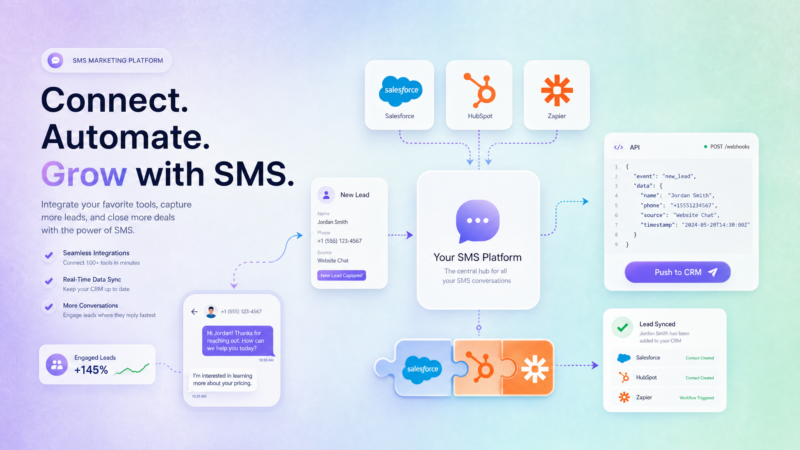
That’s what SMS API integrations are for. ZeitBlast connects to your existing stack four ways: native one-click CRM connectors, no-code automation via Zapier and Make.com, a full REST SMS API for custom builds, and outbound webhooks for real-time reactions. This guide walks through each — what it does, when to use it, and how to get the most out of it.
If you’re new to SMS marketing in general, start with our primer on what SMS marketing is and how it works before wiring it into your tools.
The Four Ways to Integrate SMS
Before diving into specifics, here’s the landscape. Every SMS integration approach involves a tradeoff between setup effort and control:
| Method | Best For | Code Required | Setup Time |
|---|---|---|---|
| Native CRM connector (Push to CRM) | Salesforce, HubSpot, Zoho — one click | None | Minutes |
| No-code automation (Zapier/Make.com) | Connecting to thousands of apps visually | None | 15–30 min |
| REST SMS API | Custom builds, your own codebase | Yes | Hours–days |
| Webhooks | Real-time event reactions from ZeitBlast to your systems | Yes | Hours |
Most teams use more than one. A real estate team might sync leads from HubSpot via Push to CRM, use Zapier to pipe form submissions into ZeitBlast, and have a developer listen on webhooks to update an internal dashboard when someone replies. All of that runs on the same compliant SMS engine.
Native CRM Integrations: Push to Salesforce, HubSpot, and Zoho
ZeitBlast’s Push to CRM feature is the fastest way to keep your contact database current. When a lead replies, opts in, or qualifies through a conversation, you push that contact — with full context — directly into Salesforce, HubSpot, or Zoho with one click.
Why This Matters
Most SMS platforms force you to build CRM sync through Zapier workarounds or manual exports. ZeitBlast ships native connectors for the three CRMs that dominate the SMB and mid-market space:
- Salesforce — Push qualified leads into your pipeline, update contact records with conversation history, and keep your sales team working from clean data.
- HubSpot — Every opted-in contact synced to HubSpot means your marketing and sales workflows have the full picture: who replied, when, and what they said.
- Zoho CRM — Zoho users can push contacts from ZeitBlast campaigns directly into their Zoho pipeline without touching an export or a CSV.
What Gets Pushed
When you push a contact to your CRM, ZeitBlast sends the contact’s details, opt-in status, and conversation history. That eliminates re-keying data and prevents the “stale CRM” problem where your texting tool and your CRM fall out of sync.
The ROI Argument
Every minute your sales rep spends manually copying contact data from a texting tool into a CRM is dead time. Push to CRM makes that work automatic. For teams running drip campaigns that generate dozens of replies a day, that’s hours recovered every week.
No-Code Automation: Zapier and Make.com
Beyond direct CRM connectors, ZeitBlast works with Zapier and Make.com — the two dominant no-code automation platforms. That opens up connections to thousands of apps: form builders, spreadsheets, help desks, e-commerce platforms, project management tools, and more.
How It Works
Both platforms use a trigger-and-action model. You pick a trigger (a new lead in a Google Sheet, a form submission in Typeform, a closed deal in your CRM) and map it to an action in ZeitBlast (add a contact, enroll them in a drip campaign, send a one-off text). No engineers needed. The visual setup takes 15–30 minutes for most zaps.
Common ZeitBlast + Zapier Workflows
- New lead → welcome text. A new entry in your CRM or a form submission triggers an immediate personalized text from ZeitBlast. Response times matter — studies show lead response within 5 minutes increases conversion by 9x.
- Booked appointment → reminder sequence. A new event in Calendly or Google Calendar kicks off a ZeitBlast reminder drip — a confirmation, a day-before nudge, and a morning-of text.
- Closed deal → referral ask. When a deal stage changes in your CRM, trigger a text asking for a referral while the relationship is warm.
- Inbound reply → task in project management. When a lead replies with a hot signal word, Zapier creates a follow-up task in Asana, Monday.com, or ClickUp.
Make.com for More Complex Flows
Make.com (formerly Integromat) handles multi-step, conditional logic better than Zapier for complex scenarios. If your automation needs branching — “send this text if the contact is tagged X, but that text if tagged Y” — Make.com’s visual scenario builder handles it cleanly without code.
For deeper workflow automation that stays inside ZeitBlast, see our guide to SMS workflow automation.
The ZeitBlast REST SMS API
For teams building custom products or needing full programmatic control, ZeitBlast exposes a REST SMS API. This is the layer for sending texts from your own application, syncing contact data on your terms, and managing everything without touching the ZeitBlast UI.
What the API Covers
The ZeitBlast REST API gives you full access to the core objects in the platform:
- Contacts — Create, read, update, and delete contacts. Sync tags, custom fields, and opt-out status.
- Messages — Send individual messages or kick off batch sends programmatically.
- Conversations — Read full conversation threads to sync context into your systems.
- Campaigns — Create and manage drip campaigns from code.
- Opt-outs — Programmatically manage DNC lists. Pair with our unlimited DNC scrub for belt-and-suspenders compliance.
- Webhooks — Register and manage webhook endpoints from the API itself.
Authentication and Rate Limits
The API uses scoped API keys — you create a key and grant it only the permissions it needs. A key managing contacts doesn’t need permission to delete campaigns. This follows standard least-privilege security practice.
Rate limits are set high enough for production send volumes while protecting platform stability. Check the developer documentation for current limits.
Client Libraries and Examples
The API docs include examples for multiple languages, so you can get started in the stack you already use. The endpoints follow REST conventions — if you’ve worked with Twilio, SendGrid, or any modern messaging API, the patterns will feel familiar.
When to Use the API vs. Zapier
Use the API when:
- You’re building a custom product (your own CRM, a SaaS app, an internal tool)
- You need real-time programmatic control over sends
- You want to sync ZeitBlast contact data into a database on your own schedule
- Zapier’s trigger model doesn’t fit your architecture
Use Zapier/Make.com when:
- You’re connecting existing apps without writing code
- Your team doesn’t have engineering resources
- Speed of setup matters more than architectural control
SMS Webhooks: React in Real Time
Webhooks are the complement to the API. Instead of your systems polling ZeitBlast for changes, ZeitBlast pushes events to your endpoint the moment they happen. No polling loop, no lag.
What ZeitBlast Can Push
- Inbound replies — The instant a contact texts back, your system knows. Useful for updating CRM records, firing alerts to sales reps, or triggering a handoff to your AI Conversation Agent.
- Delivery status — Know whether a message was delivered, failed, or filtered. Log this in your own analytics stack.
- Opt-outs — When someone texts STOP, the webhook fires immediately so your external systems can sync the DNC status in real time.
- New contacts — When a new opt-in comes in, push the event to your data warehouse or CRM pipeline.
Real-World Webhook Patterns
Hot lead alert: A lead replies with a buying signal (“Yes, I’m interested” or “What’s the price?”). The webhook fires, your code scores the reply, and it sends a Slack message to the assigned rep with the conversation link. Rep responds within seconds.
Real-time CRM sync: Every delivery status and inbound reply updates your Salesforce records automatically. No batch export, no overnight sync — your CRM reflects reality as it happens.
External analytics: Push every event to a data warehouse (BigQuery, Snowflake) for custom reporting. ZeitBlast’s real-time analytics are excellent, but some teams want raw event data in their own BI tools.
Which Integration Is Right for You?
Here’s a practical decision tree:
You use Salesforce, HubSpot, or Zoho and want contacts synced without code → Use Push to CRM. Start there — it’s the fastest path to a connected CRM.
You want to connect ZeitBlast to other apps without writing code → Use Zapier or Make.com. Zapier if your apps are mainstream and setup time matters. Make.com if your workflow needs multi-step conditional logic.
You’re a developer building a custom product or internal tool → Use the REST SMS API. Full control, standard REST conventions, comprehensive endpoint coverage.
You need your systems to react instantly when ZeitBlast events happen → Use webhooks. Set up an endpoint, register it in ZeitBlast, and events arrive in real time.
You need all of the above → That’s normal. Mix and match. A single ZeitBlast account can run native CRM sync, Zapier automations, API calls, and webhooks simultaneously.
Compliance Travels With Every Integration
One thing that doesn’t change across integrations: compliance. Whether a contact is added via Push to CRM, a Zapier zap, the API, or manually in the UI, ZeitBlast applies the same rules:
- 10DLC registration — A2P 10DLC compliance via The Campaign Registry is built in, with approval in as little as 48 hours — fastest in the industry.
- Automatic STOP handling — Opt-outs processed regardless of which integration path the contact came through, per FCC requirements.
- Unlimited DNC & litigator scrub — Every contact list is scrubbed automatically against the National DNC Registry before sending.
- Carrier-safe batching — Messages sent at carrier-approved rates, even when triggered by API calls.
- Quiet hours enforcement — No messages sent outside compliant hours, even if an API call fires at 2 AM.
Connecting ZeitBlast to your stack doesn’t create compliance gaps — it inherits ZeitBlast’s compliance layer across every integration path. For the full compliance picture, see our TCPA compliance guide.
FAQ
Does ZeitBlast have a native Salesforce integration?
Yes. ZeitBlast’s Push to CRM feature connects directly to Salesforce, HubSpot, and Zoho with one click — no Zapier required. You can push contacts, conversation history, and opt-in status from ZeitBlast directly into your Salesforce pipeline.
How do I connect ZeitBlast to HubSpot?
Use Push to CRM for a native one-click sync. Alternatively, use Zapier or Make.com to build more complex trigger-action workflows between HubSpot and ZeitBlast — like enrolling new HubSpot contacts in a ZeitBlast drip campaign automatically.
Does ZeitBlast have an SMS API?
Yes. ZeitBlast provides a REST SMS API with endpoints for contacts, messages, conversations, campaigns, opt-outs, and webhooks. It uses scoped API keys and supports standard REST patterns with examples in multiple languages.
What can I do with ZeitBlast webhooks?
You can receive real-time event pushes for inbound replies, delivery status updates, opt-outs, and new contacts. Register your endpoint in ZeitBlast and events arrive the moment they happen — no polling required.
Can I use both Zapier and the API on the same account?
Absolutely. Most teams use multiple integration paths simultaneously. Push to CRM handles your primary CRM, Zapier connects other apps, and the API handles custom logic your developers build. They all run on the same ZeitBlast account.
Is compliance maintained when I use integrations?
Yes. ZeitBlast’s compliance layer — 10DLC registration, STOP handling, DNC scrubbing, carrier-safe batching, and quiet hours — applies to every send regardless of how contacts were added or how messages were triggered. Integrations don’t create compliance gaps.
Start Texting With ZeitBlast
Your SMS platform should fit inside your stack, not sit outside it. ZeitBlast connects to Salesforce, HubSpot, Zoho, Zapier, Make.com, and your custom code — so every text you send, every reply you get, and every lead you qualify flows through a single compliant system.