
Text messaging is where modern sales conversations happen. But most CRMs weren’t built for it. They were built for email workflows, phone call logs, and meeting notes — all of which assume your team is sitting at a desk. When the primary channel is SMS, a standard CRM creates a two-system problem: leads are tracked in one place, conversations are happening somewhere else, and keeping them in sync is manual work nobody actually does.
An SMS CRM solves this by connecting your pipeline directly to your texting. The contact, the conversation thread, the deal stage, and the follow-up history all live in one place. This guide explains what that looks like in practice, how pipeline stages work in a texting context, and how ZeitBlast’s Push to CRM feature bridges your SMS activity to the CRMs your team already uses.
What Is an SMS CRM? {#what-is-an-sms-crm}
An SMS CRM is a contact management system built around text messaging as the primary communication channel. Unlike a traditional CRM that treats SMS as one of many notification options, an SMS CRM is designed from the ground up to track leads through a sales pipeline while keeping all conversations visible and actionable.
The core difference: in an SMS CRM, the conversation is the record. You don’t have to log a call, write a note, or update a field after the fact. The thread is already there — timestamped, searchable, and tied to the contact’s stage in your pipeline.
This matters because SMS is a high-frequency channel. A contact might exchange five texts with your team in a single day. A CRM that requires manual logging after each exchange is a CRM nobody logs in. By the end of the week, you’ve lost the thread.
For context on why SMS is the channel worth building a CRM around, see our guide to what SMS marketing is.
Why a Standard CRM Falls Short for Text-Based Sales {#why-a-standard-crm-falls-short}
Traditional CRMs — Salesforce, HubSpot, Zoho, and others — are excellent at what they were built for: tracking deals through email-heavy sales cycles, managing opportunities with long close windows, and generating forecasting reports. They weren’t designed for high-velocity, text-first lead generation.
Here’s where the friction shows up:
The two-app problem. Your team texts through one tool and updates the CRM in another. Every rep decides whether to sync manually. Most don’t. Data quality erodes.
No real-time conversation visibility. A manager checking the CRM sees a deal stage but not the last five texts that happened today. The stage might say “Qualified” but the contact actually said they’re not interested two days ago.
Delayed follow-up. Without the conversation surfaced alongside the pipeline, leads slip. The rep who was supposed to follow up on day three is now on day seven, because nothing reminded them.
No SMS-native workflows. Standard CRMs support email sequences natively. SMS is an afterthought — either a native feature that’s limited, or a paid add-on that only partially syncs.
The answer isn’t to replace your CRM entirely. It’s to connect your SMS platform to it — and to have an SMS-native pipeline view that works in real time. That’s exactly what ZeitBlast is built to do.
According to a 2026 TextUs survey of 763 revenue professionals, SMS reply rates top 34%, and the closing stage draws the highest response rate at 39.6% — yet texting at the close stage is one of the least-used touchpoints. The leads are ready to respond when it counts most. The bottleneck is whether your system surfaces them in time.
How SMS Pipeline Stages Work {#how-sms-pipeline-stages-work}
A sales pipeline for SMS works the same way a visual pipeline works in any CRM: contacts move through stages as their status changes. The difference is that in ZeitBlast, every stage is connected to the texting layer.
A standard pipeline might look like:
New Lead → Contacted → Qualified → Proposal Sent → Negotiating → Closed Won
In an SMS context, each stage transition is often triggered by a conversation. A lead goes from New Lead to Contacted the moment your team sends the first text. They move to Qualified after a reply confirms genuine interest. They move to Proposal Sent after a specific follow-up. Every stage change reflects what actually happened in the thread.
Custom Stages for Your Business
Not every sales process looks the same. Real estate teams might use stages like:
- Inquiry Received → Showing Scheduled → Offer Submitted → Under Contract → Closed
A recruiting firm might use:
- New Applicant → Screened → Interview Scheduled → Offer Extended → Hired
ZeitBlast’s pipeline is flexible — your stages should map to your actual process, not the other way around.
Multiple Pipeline Views
Different questions need different views. A pipeline dashboard should offer:
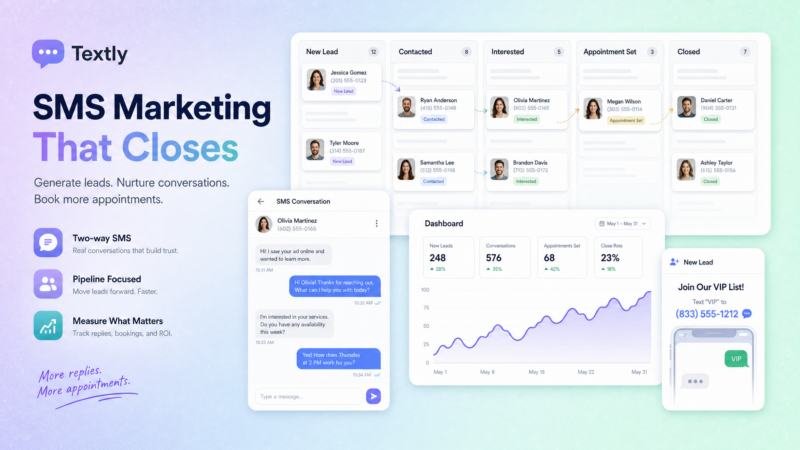
- Board view (Kanban): See every contact as a card in a column. Great for a quick read on where your whole pipeline stands.
- Table view: Rows and columns for sorting by stage, date, or custom fields. Good for bulk review and identifying stale leads.
- Map view: Plot contacts geographically. Essential for territory-based sales like real estate, where proximity to a property is a genuine qualifier.
Image suggestion: Screenshot mockup of a kanban-style SMS pipeline with stage columns. Alt text: “SMS CRM pipeline board showing leads organized by deal stage — New Lead, Contacted, Qualified, Closed Won.”
Contact Management and Conversation History {#contact-management-and-conversation-history}
Every contact in ZeitBlast carries a full conversation history — every message sent, every reply received, every stage change — in one place. When a team member opens a contact, they don’t need to ask “where did we leave off?” The thread answers that question instantly.
This is especially important for teams where multiple people might work the same lead. Shared inboxes mean any team member can pick up a conversation mid-thread without starting from scratch. The history is the context.
What a Full Contact Record Includes
- Full SMS thread — every message, timestamped, in order
- Pipeline stage — current and historical
- Opt-in status — confirmed consent and date
- Campaign history — which drip sequences they’ve been part of
- Tags and custom fields — for segmentation and filtering
- Notes — manual team observations
No more spreadsheet gymnastics. The contact record is always current.
ZeitBlast’s Push to CRM: One-Click Sync to Salesforce, HubSpot, and Zoho {#push-to-crm}
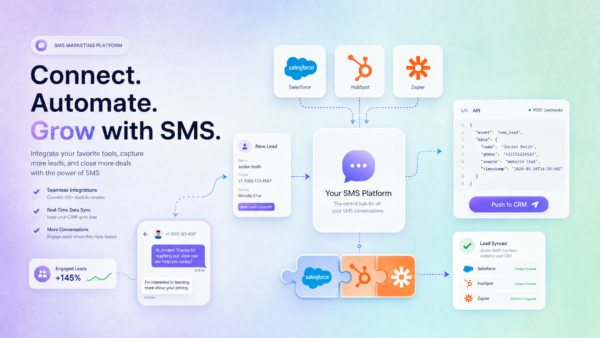
For teams that run a primary CRM alongside ZeitBlast, the Push to CRM feature closes the sync gap. With a single click, a contact and their conversation history are pushed directly to your CRM — no manual data entry, no copy-paste, no export/import workflow.
Supported integrations:
This means your revenue team can continue working in the CRM they know, while ZeitBlast handles the SMS layer. When a lead is ready to move to your CRM — after they’ve been qualified over text — they go there instantly.
Why This Matters in Practice
For solo operators: You capture the lead, work it via SMS, and push to your CRM only when it’s qualified. Your CRM stays clean — only leads that have shown genuine intent.
For teams: Everyone can see the lead in the shared SMS inbox and in the CRM simultaneously. No one is ever working with stale data.
For managers: You get full pipeline visibility in both tools. ZeitBlast shows you the texting activity; your CRM shows you the deals. No gap between the two.
Connecting SMS to the Rest of Your Stack {#connecting-sms-to-your-stack}
Push to CRM is the highest-touch integration, but ZeitBlast connects outward in several other ways:
- Zapier and Make.com — Connect ZeitBlast to thousands of apps. Trigger an SMS sequence when a Calendly appointment is booked, a Facebook Lead form is submitted, or a row is added to a Google Sheet.
- REST API and webhooks — For custom builds. Fire a webhook when a specific campaign step runs, or trigger a ZeitBlast sequence from your own application.
- 10DLC-compliant sending — All integrations route through ZeitBlast’s carrier-safe infrastructure, so automation from external tools still delivers reliably.
The goal is to make ZeitBlast the texting layer in your existing stack — not to replace your other tools, but to connect to them.
What to Look for in an SMS CRM {#what-to-look-for}
If you’re evaluating SMS CRM options, here’s a practical checklist:
| Feature | Why It Matters |
|---|---|
| Native SMS pipeline | Stages and conversations should live in the same tool, not be stitched together via integration |
| Shared team inbox | Multiple reps need visibility into the same conversations |
| Full conversation history | Per-contact thread history, not just campaign-level data |
| CRM sync / Push to CRM | One-click export to Salesforce, HubSpot, or Zoho |
| Opt-out compliance | STOP handling must be automatic and immediate |
| 10DLC registration | Messages from unregistered numbers don’t deliver reliably |
| DNC scrubbing | Protect against contacting numbers on the Do Not Call registry |
| Drip sequence support | Follow-up shouldn’t require manual sends |
| Deliverability rate | Aim for 95%+ — anything lower is a list or registration problem |
ZeitBlast hits every item on this list. The 98% deliverability rate, unlimited DNC & Litigator Scrub, and Push to CRM are designed specifically for teams that depend on text as their primary sales channel.
ZeitBlast Plans and Pricing {#zeitblast-plans-and-pricing}
| Plan | Price | Texts/Month | Best For |
|---|---|---|---|
| I’m Serious | $495/mo (billed quarterly) | 15,000 | Solo operators |
| Time to Scale | $795/mo | 30,000 | Growing teams |
| Market Dominator | $1,495/mo | 65,000 | Multi-market operations |
All plans include:
- Unlimited incoming and reply messages (always free)
- Credit rollover — unused texts carry forward
- 10DLC approval in as little as 48 hours
- Live phone, chat & email support
- Push to CRM (Salesforce, HubSpot, Zoho)
- Optional AI Conversation Agent
- Cancel anytime
Start Texting with ZeitBlast
Stop running your lead pipeline across two systems. Request a demo at zeitblast.com/contact and see how ZeitBlast connects your SMS conversations to your CRM in one click.
Frequently Asked Questions {#frequently-asked-questions}
What is an SMS CRM? An SMS CRM is a contact management system built around text messaging as the primary sales channel. It ties your pipeline stages directly to your SMS conversations — so the thread, the deal stage, and the contact record all live in one place instead of scattered across separate tools.
How does ZeitBlast’s Push to CRM feature work? Push to CRM lets you sync a contact and their full conversation history to Salesforce, HubSpot, or Zoho with a single click. No manual export or data entry required. Qualified leads flow directly from your SMS inbox into your CRM.
Can multiple team members work the same lead? Yes. ZeitBlast uses a shared conversations inbox, so any team member can see and reply to an active thread. The full conversation history is visible to everyone, so there’s no “starting from scratch” when a different rep picks up a lead.
Do I need to replace my existing CRM to use ZeitBlast? No. ZeitBlast is designed to complement your existing CRM, not replace it. Use ZeitBlast to handle the texting layer, then push qualified leads to Salesforce, HubSpot, or Zoho when they’re ready. Your team keeps working in the tools they know.
What pipeline stages does ZeitBlast support? ZeitBlast’s pipeline is fully customizable. Default stages follow a standard sales flow, but you can add, rename, or remove stages to match your exact process — whether you’re in real estate, recruiting, or any other industry.