
Most leads don’t reply to the first text. They reply to the third. The problem is that most teams never send the third one — not because they don’t want to, but because nobody remembered.
SMS workflow automation solves that. You build the sequence once — a trigger, a message, a wait, a follow-up — and it runs automatically for every contact that qualifies. The right text goes out at the right time, whether you’re in the office, on the road, or asleep.
This guide covers how text automation works, what the building blocks are, how replies get routed to humans, and how ZeitBlast’s drip campaigns and AI Conversation Agent handle the execution.
What Is SMS Workflow Automation? {#what-is-sms-workflow-automation}
SMS workflow automation is software that sends text messages based on rules and timing instead of manual effort. You define the logic — what kicks off the sequence, what messages go out, how long to wait between them, and what path a contact takes based on how they respond. The system does the rest.
The core insight is simple: the best follow-up is the one that actually happens. A manual process depends on someone remembering to send the third text on day five. An automated sequence does it every single time, for every single contact.
This matters more at scale. A single salesperson can juggle a handful of active conversations. A team working hundreds of leads simultaneously can’t. SMS workflow automation is how volume and consistency coexist.
According to data from Vero’s SMS Marketing Report, automated drip sequences convert at a 3.81% click-to-conversion rate versus 0.97% for manual broadcasts — nearly four times the result for messages you write once and never touch again.
For a broader look at the channel itself, see our guide to what SMS marketing is.
The Four Building Blocks of Any Text Sequence {#the-four-building-blocks}
Every SMS workflow — no matter how complex — is assembled from the same four elements:
1. Trigger
The event that starts the sequence. A trigger could be:
- A new lead entering your system
- A form submission on your website
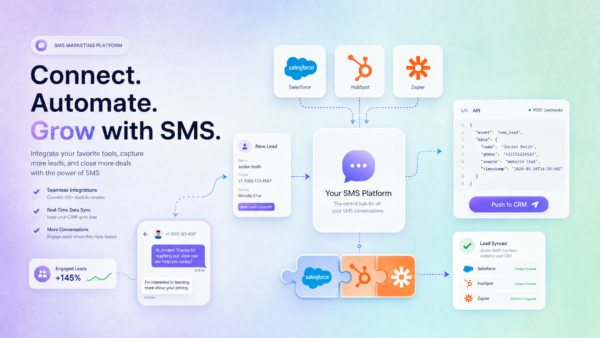
- A webhook fired from your CRM
- A specific date or time (appointment reminders, renewal notices)
- A contact being added to a list manually
The trigger is what makes automation reactive. When the condition is met, the sequence fires automatically — no manual action required.
2. Send
The text message that goes out. Each send step holds one message, personalized with merge fields (first name, property address, custom data). You write it once; the system fills in the details per contact.
Tip: Keep each message focused on a single ask. One text, one next step.
3. Wait
The delay between messages. A wait step holds the sequence for a defined period — an hour, a day, three days — before firing the next send. Wait steps are what separate a good nurture sequence from a spam blast. Spacing your messages over time keeps contacts engaged without overwhelming them.
4. Branch
A fork in the road based on contact behavior. The most common branch is replied vs. not replied:
- Contacts who replied → route to the inbox for a human conversation
- Contacts who didn’t reply → continue the automated sequence with a follow-up
Branches let your sequence adapt to reality. Not everyone responds the same way; a good workflow handles both paths.
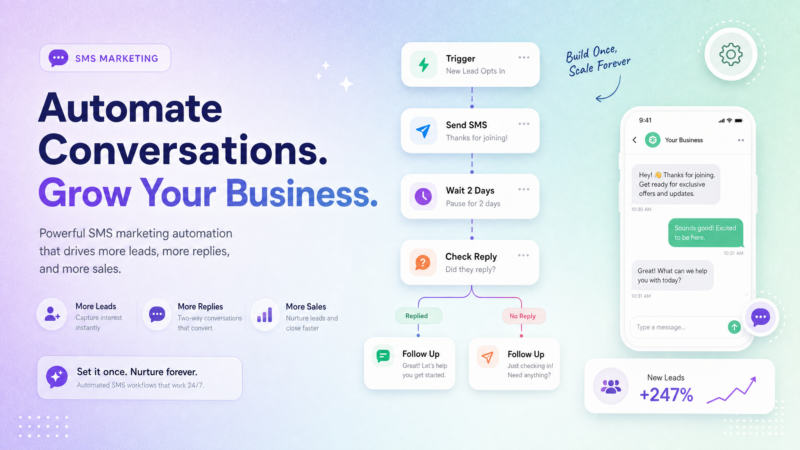
String these together — trigger → send → wait → branch → follow-up → repeat — and you have a sequence that runs on autopilot from first contact to live conversation.
Image suggestion: Flowchart showing trigger → send → wait → branch (replied / not replied) → follow-up. Alt text: “SMS workflow automation diagram showing trigger, send, wait, and branch steps.”
How Sequences Run Automatically {#how-sequences-run-automatically}
Once a workflow is published in ZeitBlast, it applies to every contact that hits the trigger. Each contact moves through the steps on their own timeline — a lead who enters today and one who enters next week both get the same disciplined follow-up without any overlap or confusion.
Here’s what that looks like in practice:
- A new lead submits a form on your website
- The trigger fires; they’re added to your ZeitBlast drip campaign
- Within seconds, the first message goes out: “Hey [First Name], saw your inquiry about [Property Address] — happy to answer any questions. Reply back anytime.”
- If no reply after 24 hours, the wait step expires and the second message sends automatically
- If still no reply after 48 more hours, the third message goes out
- A contact who replies at any point branches out of the sequence and routes to the inbox
You build it once. It runs for everyone. That’s the entire value proposition.
ZeitBlast’s Carrier-Safe Batching ensures messages send at carrier-approved rates — so even large sequences don’t trigger spam filters or deliverability problems. Combined with 98% deliverability and direct carrier relationships, your automated sequences actually arrive.
When Replies Come In: Routing to a Real Person {#when-replies-come-in}
Automation handles the timing. It does not handle the conversation.
The moment a contact replies to any message in a ZeitBlast drip sequence, that reply lands in your shared conversations inbox where a real person picks it up. The automated sequence did the hard work — it got the lead to respond. Your team takes it from there.
This handoff is critical. According to Salesmessage’s 2026 SMS Marketing Statistics, 42% of total replies come from follow-up messages, not the first text. A sequence that keeps going is the one that gets the answer. But when that answer comes, automation steps aside and a human closes the deal.
The rule is simple: machines are excellent at “send the third text on day four.” They’re not equipped to handle a real objection, negotiate a price, or build a relationship. ZeitBlast keeps each on the right side of that line.
Incoming messages are always free on all ZeitBlast plans — unlimited reply messages included. You’re never penalized for starting a conversation.
Common Use Cases for SMS Workflow Automation {#common-use-cases}
The same trigger → send → wait → branch pattern covers most follow-up scenarios across industries.
Speed-to-Lead
A new lead comes in. The first text fires within seconds — while they still remember filling out the form. This is the single biggest lever on conversion. Research consistently shows that responding to a lead within 5 minutes dramatically increases the odds of qualification. Automation is the only way to hit that window every time, for every lead.
Real Estate Follow-Up
A prospect inquires about a listing. The sequence follows up automatically over the next week — answering common questions, sharing property details, and nudging them toward a showing. Your team only jumps in when someone raises their hand. For more on this, see our guide to SMS marketing for real estate.
Appointment Reminders
An appointment is scheduled. A time-based sequence sends a confirmation, then a 24-hour reminder, then a 2-hour reminder. Fewer no-shows, less manual chasing.
Lead Nurture
Not every lead is ready now. A nurture sequence spaces out value over days or weeks — one useful text at a time — keeping you top of mind without manual effort. When they’re ready, they reply.
Win-Back Campaigns
A list has gone cold. A short re-engagement sequence sends a check-in, waits, then sends an offer. The contacts who respond route straight to a human. Some percentage will always come back; automation makes sure you ask.
Drip Campaigns vs. One-Time Blasts {#drip-campaigns-vs-one-time-blasts}
It’s worth understanding where workflows fit relative to one-time sends.
| One-Time Campaign | Drip / Workflow | |
|---|---|---|
| What it does | Sends one message to a list in a single window | Runs a multi-step sequence per contact over time |
| Best for | Announcements, promos, event reminders | Follow-up, nurture, onboarding, re-engagement |
| Cadence | Single send | Multiple messages over days or weeks |
| Effort | Write once, send once | Write once, runs forever |
Most high-performing teams use both: a campaign to open (announce a new listing, launch a promotion), and a drip workflow to follow up with everyone who didn’t respond. The campaign seeds the list; the workflow works it.
See our guide to SMS campaign management for more on how one-time sends work alongside automated sequences.
ZeitBlast’s AI Conversation Agent: Human-Quality Responses at Scale {#zeitblast-ai-conversation-agent}
ZeitBlast includes an optional AI Conversation Agent that takes automation a step further. Instead of just sending timed messages, the AI Conversation Agent can:
- Automatically handle incoming replies — qualifying leads, answering common questions, and continuing the conversation without human intervention
- Follow up based on conversation context — not just a timer
- Qualify contacts according to your rules — flagging hot leads for immediate human follow-up
- Eliminate the need for virtual assistants to monitor the inbox around the clock
Think of it as a first responder. When a lead replies at 11 PM on a Sunday, the AI Conversation Agent handles it — professionally, on-brand, and within your defined rules. Your team reviews the qualified conversations when they’re back in the office.
For teams that text at volume, the AI Conversation Agent is the difference between a 9-5 operation and a 24/7 lead generation machine.
Compliance Built Into Every Step {#compliance-built-into-every-step}
A multi-step sequence that accidentally texts someone who opted out is worse than no automation at all. ZeitBlast handles compliance automatically so you don’t have to think about it:
- STOP handling — opt-outs are honored immediately and that contact is removed from all future sends, including any active sequences
- Unlimited DNC & Litigator Scrub — numbers on the Do Not Call registry and known litigators are filtered before any message sends
- 10DLC compliance — ZeitBlast is fully A2P 10DLC compliant, with approval in as little as 48 hours (fastest in the industry)
- Carrier-Safe Batching — messages send at carrier-approved rates so automated sequences don’t trigger carrier filters
For a full breakdown of what the FCC rules require, see our guide to TCPA compliance.
How to Get Started with ZeitBlast {#how-to-get-started}
ZeitBlast plans start at $495/month (billed quarterly) and include:
| Plan | Price | Texts/Month |
|---|---|---|
| I’m Serious | $495/mo | 15,000 |
| Time to Scale | $795/mo | 30,000 |
| Market Dominator | $1,495/mo | 65,000 |
Every plan includes unlimited incoming messages, credit rollover, 10DLC approval in 48 hours, live phone/chat/email support, and a premium local sending number. The AI Conversation Agent is available as an add-on.
No hidden carrier fees. No per-message surprises. Cancel anytime.
Start Texting with ZeitBlast
You built the sequence once. It follows up forever. Request a demo at zeitblast.com/contact and see how ZeitBlast drip campaigns run on autopilot.
Frequently Asked Questions {#frequently-asked-questions}
What is SMS workflow automation? SMS workflow automation sends text messages based on rules and schedules instead of manual effort. You define a trigger, the messages to send, the delays between them, and branches for different reply paths — and the system executes the sequence for every contact automatically.
How do drip campaigns differ from one-time SMS blasts? A one-time campaign sends a single message to a list all at once. A drip campaign (or workflow) runs a sequence of messages per contact over time — with waits, branches, and follow-ups. Drips are used for nurture, onboarding, and multi-touch follow-up where a single text isn’t enough.
Do automated texts feel impersonal to recipients? Not when they’re done right. Merge fields personalize each message with the recipient’s name and relevant details. And the moment someone replies, the conversation routes to a human — automation handles the timing, people handle the relationship.
Is automated SMS compliant? Yes — when you use a platform like ZeitBlast that enforces compliance automatically. ZeitBlast handles STOP/opt-out processing, DNC scrubbing, litigator filtering, and 10DLC registration across every step of every automated sequence.
What triggers can start an SMS workflow? Common triggers include: a new lead entering your system, a form submission, a webhook from a CRM, a specific date/time (for reminders), or a contact being manually added to a list. Any event your system can detect can be used as a workflow trigger.