
You can’t fix what you can’t see.
Every SMS campaign you send generates data — and most teams look at exactly one number: how many texts went out. That’s the least useful metric. It tells you what you sent, not what happened. Whether the messages arrived, whether anyone responded, whether people opted out, whether there’s a deliverability problem building underneath — none of that shows up in a sent count.
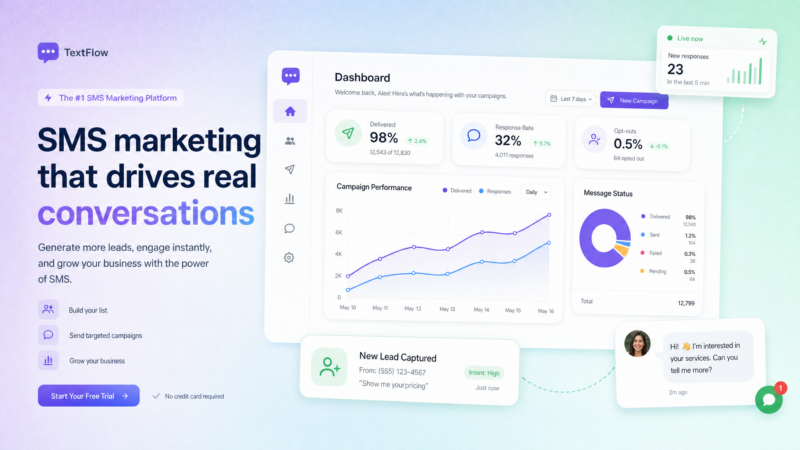
SMS marketing analytics is the practice of tracking what actually happened after the send. ZeitBlast’s real-time dashboard puts seven core metrics in a single view and refreshes close to live, so you can monitor a campaign as it runs and act on what you see — not the morning after.
This guide explains what each metric means, how to read them together, and what to do when the numbers tell you something’s wrong.
What Is SMS Marketing Analytics? {#what-is-sms-marketing-analytics}
SMS marketing analytics is the measurement of how your text campaigns perform — from dispatch through delivery through response. It tracks the full path of a message: did it leave your platform, did it reach a handset, did the recipient reply, did anyone opt out, did any messages fail entirely.
Good analytics answers three questions:
- Did my messages get there? (Delivery rate)
- Did they start a conversation? (Response rate)
- Did anything go wrong? (Failed, undelivered, opt-out rate)
Without that data, you’re flying blind. A campaign can look like it’s working — high sent count, no obvious errors — while quietly losing 20% of messages to a carrier filter. Or it can look like a deliverability problem when it’s actually a copy problem: messages are arriving fine, but nobody’s responding.
The analytics dashboard is what separates those two situations.
For more on how campaigns are built and sent, see our guide to SMS campaign management.
The Seven Metrics That Tell You What Happened {#the-seven-metrics}
ZeitBlast’s dashboard tracks seven core metrics across every campaign send:
| Metric | What It Counts | What It Tells You |
|---|---|---|
| Sent | Messages dispatched from ZeitBlast | Your volume — the baseline everything else reads against |
| Delivered | Messages the carrier confirmed reached a handset | Your actual reach; a widening gap from Sent is an early warning |
| Received | Replies coming back from contacts | Engagement — did the message start a conversation |
| Undelivered | Left ZeitBlast; carrier couldn’t complete the delivery | Usually a list-quality problem: stale, disconnected, or blocked numbers |
| Failed | Never made it out of ZeitBlast at all | Usually a setup problem: configuration, 10DLC registration, or formatting |
| Opt-out rate | STOP replies as a share of delivered messages | Frequency and targeting feedback — a sudden jump means something hit wrong |
| Response rate | Replies as a share of delivered messages | The closest thing to “did it work” — high delivery + low response = copy problem |
These seven metrics tell a complete story when read together. Individually, most of them are noise. The signal is in the relationships between them.
Image suggestion: ZeitBlast analytics dashboard showing all seven metric cards in a single view. Alt text: “ZeitBlast SMS marketing analytics dashboard showing sent, delivered, received, undelivered, failed, opt-out rate, and response rate.”
What Each Metric Means in Practice {#what-each-metric-means}
Sent
The total number of messages dispatched from ZeitBlast. This is your volume — the top of the funnel for any campaign. Every other metric is measured against it.
By itself, the sent count means very little. 10,000 sent could mean 9,800 delivered and 3,200 replies — or 10,000 sent with 4,000 undelivered and 12 replies. The sent count is where the story starts, not where it ends.
Delivered
Messages the carrier confirmed reached a handset. This is your real reach — the percentage of the people you tried to contact who actually got the message.
Watch delivered vs. sent over time. A healthy campaign shows delivered tracking close to sent. A widening gap between the two is your earliest warning sign — something is intercepting messages before they reach recipients. Possible causes include:
- Stale or recycled numbers on your list
- Carrier filtering triggered by message content or send patterns
- 10DLC registration issues on a number
- Contacts who have blocked your number
ZeitBlast’s direct carrier relationships and Carrier-Safe Batching — developed in line with CTIA messaging guidelines — are designed to keep your delivered rate close to sent. The platform’s overall 98% deliverability rate reflects what’s achievable with proper setup and list hygiene.
Received
Replies coming back from your contacts. This is your inbound count — questions, confirmations, “yes I’m interested,” scheduling requests. Inbound is where texting earns its keep.
High received numbers mean your message started conversations. Those conversations route to your shared inbox, where your team picks them up. Received is also what moves leads through your sales pipeline. For more on how that works, see our guide to SMS CRM pipeline management.
Undelivered
Messages that left ZeitBlast but the carrier couldn’t complete — a disconnected number, a device that’s been off for weeks, a number that’s been recycled to a new person, or a carrier block at the recipient level.
Undelivered is almost always a list-quality problem. If your undelivered rate spikes, the issue is usually the list:
- Numbers that are old and no longer active
- Contacts who were never properly verified
- Numbers acquired through methods that may not reflect real, active leads
The fix is list hygiene: remove numbers that bounce repeatedly, use consent-verified lists, and don’t blast cold databases you haven’t validated.
Failed
Messages that didn’t make it out of ZeitBlast at all. Failed is different from undelivered — undelivered got out and came back; failed never left.
Failed is almost always a setup problem. When failures climb, the issue is usually:
- A sending number that hasn’t completed 10DLC registration
- Message formatting that triggers automatic rejection
- Configuration errors in the sending account
- Campaign fee or account status issues
Failed messages tell you to look inward — at your setup, not your list. ZeitBlast’s 10DLC approval in as little as 48 hours is specifically designed to keep this number at zero.
Opt-Out Rate
The percentage of delivered messages that generated a STOP reply. ZeitBlast handles STOP automatically and immediately — the contact is removed from all future sends, including any active sequences.
The opt-out rate is your frequency and targeting feedback. Per Twilio’s SMS marketing benchmarks, a healthy opt-out rate sits below 1% per send. Rates above 2% are a flag worth investigating.
A steady trickle of opt-outs is normal and expected — not everyone who initially opted in will remain interested forever. A sudden spike means something in that specific campaign hit wrong: the message was too aggressive, the timing was bad, the audience was wrong, or the contacts didn’t remember opting in.
Do not try to engineer the opt-out rate down by making it harder to stop. TCPA regulations require that STOP be honored, and a compliant opt-out process is always better than an angry contact who files a complaint. For more on this, see our guide to TCPA compliance.
Response Rate
Replies as a share of delivered messages. This is the closest thing SMS analytics gives you to a binary answer: did it work?
High delivery rate with a low response rate means your messages are arriving and doing nothing. That’s a content signal, not a deliverability signal. The message landed — it just didn’t move anyone to reply. The fix is in the copy: change the opener, sharpen the offer, add a clearer reply prompt, and test again.
Industry benchmarks vary widely by vertical, but response rates for well-targeted, personalized SMS campaigns typically run between 10% and 30%. Cold, unoptimized campaigns can run under 5%. Track your own baseline and improve against it.
How to Read the Numbers Together {#how-to-read-the-numbers-together}
Single metrics are misleading. The signal lives in the ratios.
Here’s how to think about the relationships:
Sent → Delivered: Your reach. If this gap is growing, you have a list quality or deliverability problem. Fix the list or check your 10DLC status before sending more.
Delivered → Received: Your engagement. If delivery is strong but received is low, the problem is the message — not the infrastructure. Rewrite the copy, sharpen the offer, or tighten the audience.
Delivered → Opt-out rate: Your targeting. A high opt-out rate relative to delivered means the message reached people who didn’t want it. Improve segmentation or cadence.
Sent → Failed: Your setup. Any significant failed count means something is wrong with your configuration, not your list. Address this before any other optimization.
A practical framework:
- Check Sent vs. Delivered first — confirm reach is as expected
- Check Failed — if nonzero, fix setup before reviewing anything else
- Check Undelivered — if high, clean the list
- Check Response Rate — if low despite good delivery, rewrite the message
- Check Opt-Out Rate — if spiking, reduce frequency or tighten targeting
Real-Time Monitoring: Act During the Send, Not After {#real-time-monitoring}
ZeitBlast’s analytics dashboard updates in near real time. You can monitor a campaign as it sends and intervene while it still matters.
This is the practical difference between SMS analytics and email analytics. Email campaigns send instantly and you review results the next morning. A large SMS campaign to 10,000 contacts can take time to send — and ZeitBlast shows you live progress throughout.
If you see undelivered spiking early in a send, you can pause the campaign, investigate the issue, and decide whether to continue. If opt-outs jump in the first 500 sends, you can stop before the problem scales.
Real-time visibility isn’t just a nice feature — it’s a campaign management tool. The ability to intervene during a send is one of the clearest advantages of a managed SMS platform over bulk texting tools that fire and forget.
ZeitBlast’s AI Conversation Agent and Analytics {#ai-and-analytics}
ZeitBlast’s optional AI Conversation Agent extends your analytics capability in a specific direction: handling inbound replies so that high response rates don’t create a bottleneck.
When a campaign drives strong response rates — which is the goal — someone has to answer. The AI Conversation Agent automatically handles initial replies, qualifies leads based on your rules, and routes hot conversations to your team. It means your analytics can show a 25% response rate without requiring 25% of a campaign’s recipients to queue up for a human to get to them individually.
The AI Conversation Agent is available as an add-on on all ZeitBlast plans and is particularly valuable for high-volume campaigns where response volume would otherwise outpace team capacity.
Common Problems the Dashboard Surfaces (and How to Fix Them) {#common-problems}
| Dashboard Signal | Likely Problem | Fix |
|---|---|---|
| High undelivered rate | Stale or unverified list | Clean the list; remove repeated bouncers |
| High failed rate | Setup or 10DLC issue | Check registration, formatting, account status |
| Low response rate despite strong delivery | Copy or offer problem | Rewrite the message; test new opener |
| Opt-out rate spike | Wrong audience or too frequent | Pause and review targeting and cadence |
| Delivered tracking far below sent | Carrier filtering or number reputation issue | Check 10DLC status; reduce send velocity |
| Zero received despite deliveries | Reply instructions missing or unclear | Add explicit reply prompt to message |
ZeitBlast Plans and Pricing {#zeitblast-plans-and-pricing}
| Plan | Price | Texts/Month | Best For |
|---|---|---|---|
| I’m Serious | $495/mo (billed quarterly) | 15,000 | Solo operators |
| Time to Scale | $795/mo | 30,000 | Growing teams |
| Market Dominator | $1,495/mo | 65,000 | Multi-market operations |
All plans include:
- Unlimited incoming and reply messages (always free)
- Real-time campaign analytics dashboard
- Credit rollover — unused texts carry forward
- 10DLC approval in as little as 48 hours
- Live phone, chat & email support
- Unlimited DNC & Litigator Scrub
- Optional AI Conversation Agent
- Cancel anytime
Start Texting with ZeitBlast
See your campaigns in numbers — and know exactly what to fix. Request a demo at zeitblast.com/contact and get a look at ZeitBlast’s real-time analytics dashboard.
Frequently Asked Questions {#frequently-asked-questions}
What is SMS marketing analytics? SMS marketing analytics is the measurement of how text campaigns perform — how many messages were sent, how many were delivered, how many generated replies, and how many failed, went undelivered, or triggered opt-outs. It turns raw campaign activity into actionable data.
What metrics does ZeitBlast’s analytics dashboard track? ZeitBlast tracks seven metrics: sent, delivered, received, undelivered, failed, opt-out rate, and response rate. Together they show the complete path of a campaign send, from dispatch to reply.
What’s the difference between undelivered and failed? Undelivered means the message left ZeitBlast but the carrier couldn’t complete delivery — typically a list-quality problem like a stale or disconnected number. Failed means the message never left ZeitBlast at all, which points to a setup or configuration issue on the sending side.
How often does the ZeitBlast analytics dashboard update? ZeitBlast’s dashboard updates in near real time, giving you close-to-live data during an active send. You can monitor a campaign as it runs and pause it if something looks wrong — rather than reviewing results after the fact.
What’s a good SMS response rate? It varies by vertical, offer, and list quality, but well-targeted, personalized campaigns typically see response rates between 10% and 30%. Cold or poorly segmented campaigns often run under 5%. Track your own baseline and improve against it rather than relying solely on industry averages.
What does a high opt-out rate mean? A normal opt-out rate runs below 1% per send. Rates above 2% usually indicate a frequency problem (you’re texting too often), a targeting problem (you’re reaching people who didn’t expect to hear from you), or a content problem (the message felt aggressive or irrelevant). Address the root cause before sending the next campaign.